Valentine
Tutorial realizzato con PSP.
Tutti i tutorial sono personali.
Ogni somiglianza è puramente casuale. |
MATERIALE

Tube: SvB (871) Beauty
Maschera: Penelope Mask 2
Decor: deco_alana_1
Texture: texturemate-pattern-denim6
PLUGINS
Screenworks → Dot Screen
 |
Usa la freccia per segnare la tua riga
Clicca con il mouse per spostarla
|
Procedimento
1_. Apri una nuova immagine trasparente di 900 x 600 px.
2_. Riempi con un gradiente Linear: Angle 45 / Repeats 0.
3_. Selections → Select All.
4_. Selections → Modify → Contract: 19.
5_. Effects → Texture Effects → Texture: texturemate-pattern-denim6, con le impostazioni qui sotto.
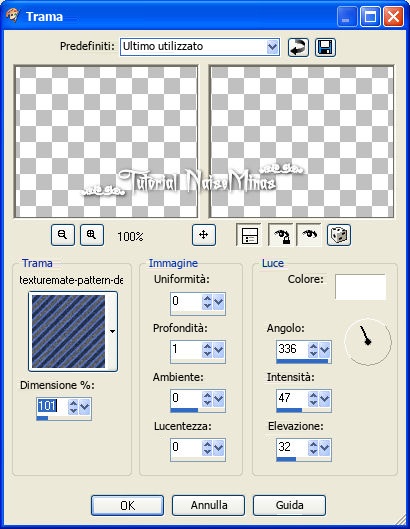
6_. Layers → New Raster Layer.
7_. Selections → Modify: 32.
Riempi di nuovo con lo stesso gradiente.
8_. Effects → Plugins → Screenworks → Dot Screen.
9_. Selections → Modify: 22.
10_. Layers → New Raster Layer.
Riempi di nuovo con lo stesso gradiente.
11_. Scegli un'immagine: Edit → Copy.
Edit → Paste Into Selection.
12_. Selections → Invert.
13_. Effects → 3D Effects → Inner Bevel.
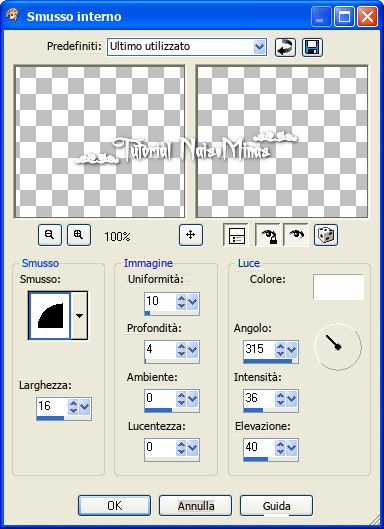
Selections → Select None.
14_. Layers → New Raster Layer.
15_. Riempi con lo stesso gradiente.
16_. Applica la maschera Penelope Mask 2 ed elimina il livello della maschera.
17_. Adjust → Add/Remove Noise → Add Noise: Uniform 15, oppure a tuo piacere.
18_. Applica i tuoi tube e il decor a piacere.
19_. Firma il tuo lavoro e salva in formato JPG.
ALTRO MODELLO

Crediti:
Tutorial, grafica e impaginazione: Naise Minas
Tubes: SvB e CibiBijoux
Misted di paesaggio: JVDE
Tutorial creato da Naise Minas - NM Criações
in data 28/06/2015.
Copyright ©2012/2026 - Web Design - Naise Minas


