|
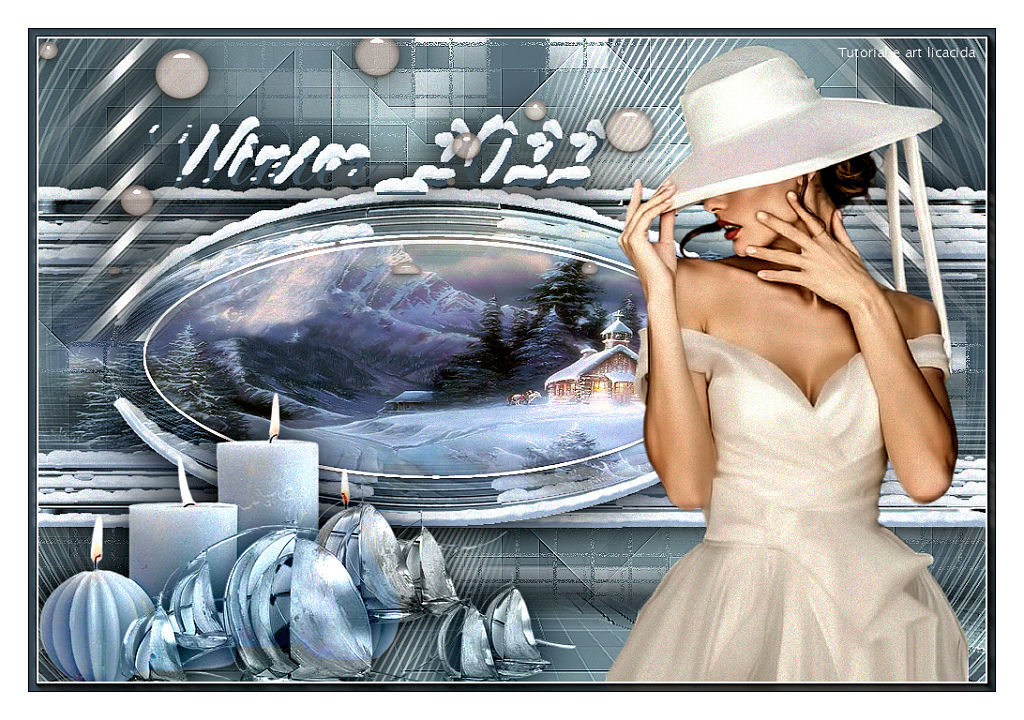
Winter 2022
TRADUÇÕES

MATERIAL

Preset: gold (Eye Candy 5: Impact → Glass) --
Dê duplo clique sobre o preset para importá-lo ao plugin.
Seleções: Selection #1 a Selection #4, salvas no canal alfa da imagem alphachannelwinter_2022.
Efeitos: efeitoellipse_SnowDrift
efeitoretangulo_SnowDrift
Tubes: Callitubes-2632mulheres
Callitubes-69natal
Decor: deco1-lc
deco2-lc
deco3-lc
Adereços: adereço
Callitubes-322decor
Callitubes-319decor
Título: titulobylc
Marca-d'água.
Efeitos do PSP.
PLUGINS
Plugin Alien Skin Eye Candy 5: Impact → Motion Trail
Plugin Alien Skin Eye Candy 5: Impact → Glass
Plugin Alien Skin Eye Candy 5: Impact → Perspective Shadow
Plugin MuRa's Meister → Pole Transform
Plugin MuRa's Meister → Perspective Tiling
Plugin dsb flux → Linear Transmission
Plugin VM Distortion → Distortion by Brightness
Plugin Mehdi → Sorting Tiles
Plugin AAA Frames → Foto Frame
TUTORIAL
|
Esta seta marca sua linha
Clique e arraste para movê-la
|
|
Configure: Foreground: #4d5c67 (cor escura) — Background: #cfe8e9 (cor clara).
1_.
Abra o arquivo alphachannelwinter_2022.
Selections → Load/Save Selection → Load Selection From Alpha Channel → Selection #1.
2_.
Pinte com o gradiente formado pelas cores configuradas acima.
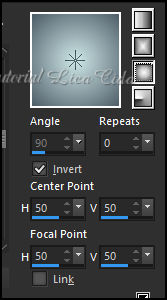
Configure: Style: Linear — Angle: 90 — Repeats: 0 — Invert desmarcado.
3_.
Effects → 3D Effects → Inner Bevel.
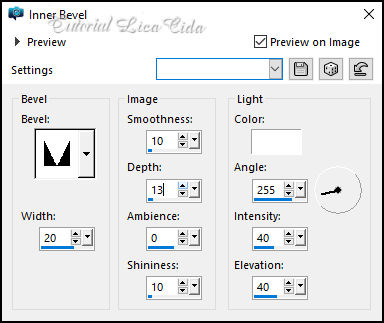
Selections → Select None.
4_.
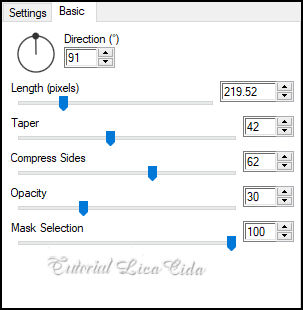
Plugin Alien Skin Eye Candy 5: Impact → Motion Trail — Basic.
5_.
Plugin dsb flux → Linear Transmission.
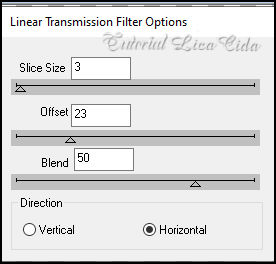
Layers → Duplicate.
Image → Mirror → Mirror Vertical.
Layers → Merge → Merge Down.
Effects → Edge Effects → Enhance More.
6_.
Effects → Distortion Effects → Pinch — Strength: 100%.
Edit → Repeat.
Layers → Duplicate.
7_.
Image → Free Rotate.
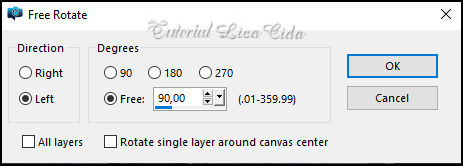
8_.
Effects → Image Effects → Offset: H: -350 / V: 0 — Custom e Transparent marcados.
9_.
Plugin MuRa's Meister → Pole Transform.
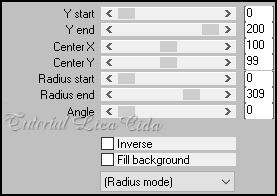
Layers → Duplicate.
Image → Mirror → Mirror Horizontal.
Layers → Merge → Merge Down.
Layers → Arrange → Move Down.
10_.
Ative a Raster 1.
Layers → Duplicate.
Effects → Geometric Effects → Circle — Transparent.
11_.
Layers → New Raster Layer.
Selections → Load/Save Selection → Load Selection From Alpha Channel → Selection #2.
12_.
Edit → Copy no tube Callitubes-69natal
Edit → Paste Into Selection.
Adjust → Sharpness → Sharpen.
13_.
Selections → Modify → Contract: 35 px.
Selections → Promote Selection to Layer.
14_.
Plugin Alien Skin Eye Candy 5: Impact → Glass — Settings: gold.
15_.
Selections → Modify → Select Selection Borders.
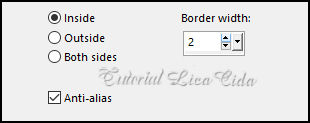
Layers → New Raster Layer.
Pinte com a cor #ffffff.
Selections → Select None.
Layers → Merge → Merge Down (aplique duas vezes).
Adjust → One Step Photo Fix.
16_.
Ative a Raster 1.
Layers → New Raster Layer.
Selections → Load/Save Selection → Load Selection From Alpha Channel → Selection #3.
17_.
Edit → Paste Into Selection (o tube Callitubes-69natal deve estar na memória).
Selections → Select None.
Adjust → Sharpness → Sharpen More.
Layers → Duplicate.
Layers → Merge → Merge Down.
18_.
Layers → New Raster Layer.
Layers → Arrange → Send to Bottom.
Pinte com o gradiente Sunburst, formado pelas cores configuradas acima.
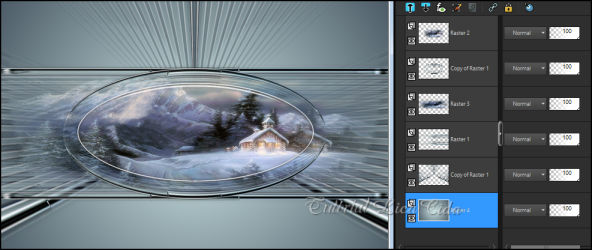
LAYERS
19_.
Ative a Raster 4.
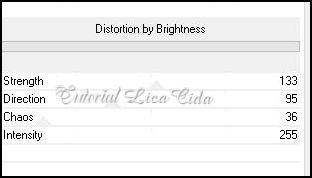
Plugin VM Distortion → Distortion by Brightness.
20_.
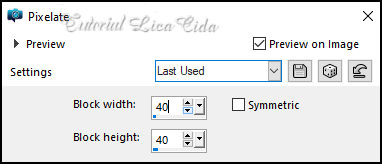
Effects → Distortion Effects → Pixelate.
21_.
Plugin Mehdi → Sorting Tiles.
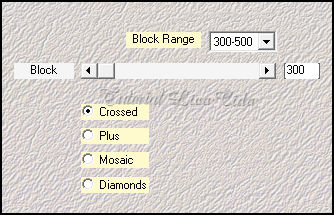
Effects → Edge Effects → Enhance More.
Layers → Duplicate.
22_.
Plugin MuRa's Meister → Perspective Tiling.
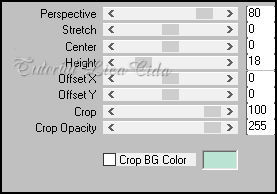
Com a ferramenta Magic Wand, Feather: 60, clique na parte transparente e tecle Delete (quatro ou cinco vezes, para suavizar o efeito).
Selections → Select None.
Effects → User Defined Filter → Emboss_3.
Effects → Reflection Effects → Rotating Mirror: 0 / 180 — Reflect.
Plugin Alien Skin Eye Candy 5: Impact → Perspective Shadow: use a gosto.
23_.
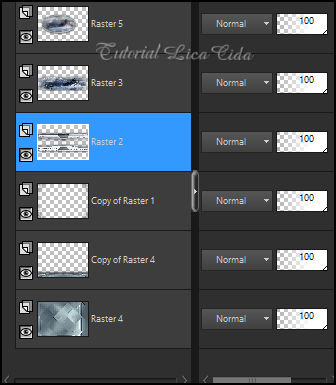
Ative a layer indicada no print (observe a seta).
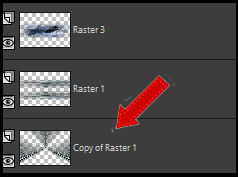
Edit → Repeat: Plugin MuRa's Meister → Pole Transform (print do item 9).
Effects → Edge Effects → Enhance More.
Edit → Repeat: Plugin Alien Skin Eye Candy 5: Impact → Perspective Shadow: use a gosto.
24_.
Selections → Load/Save Selection → Load Selection From Alpha Channel → Selection #4.
Tecle Delete.
Selections → Select None.
25_.
Ative a Copy of Raster 1 (abaixo da layer do topo).
Retire a visibilidade da layer.
Edit → Copy no efeitoellipse_SnowDrift
Edit → Paste As New Layer.
Layers → Arrange → Move Down.
Delete a layer em que você retirou a visibilidade.
Na Raster 5: Plugin Alien Skin Eye Candy 5: Impact → Perspective Shadow: use a gosto.
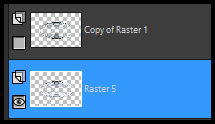
Na layer do topo: Layers → Merge → Merge Down.
26_.
Com a ferramenta Pick Tool: Position X: 27 — Position Y: 118.
Tecle M para desativar a ferramenta.
27_.
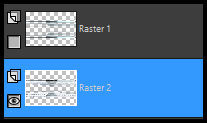
Ative a Raster 1 (layer do retângulo).
Retire a visibilidade da layer.
Edit → Copy no efeitoretangulo_SnowDrift
Edit → Paste As New Layer.
Layers → Arrange → Move Down.
Delete a layer em que você retirou a visibilidade.
Na Raster 2: Plugin Alien Skin Eye Candy 5: Impact → Perspective Shadow: use a gosto.
LAYERS
28_.
Na Raster 4 (do fundo):
Edit → Copy no deco1-lc
Edit → Paste As New Layer.
29_.
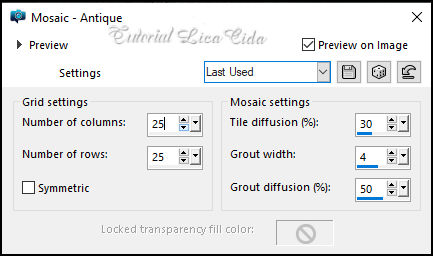
Effects → Texture Effects → Mosaic - Antique.
30_.
Effects → Image Effects → Seamless Tiling: Default — Transition: 100%.
Effects → Edge Effects → Enhance.
31_.
Edit → Copy no deco2-lc
Edit → Paste As New Layer.
Use a ferramenta Pick Tool para acertar a altura.
Blend Mode: Screen.
Layers → Arrange → Move Up.
32_.
Ative a layer do topo.
Edit → Copy no deco3-lc
Edit → Paste As New Layer.
Objects → Align → Top.
Plugin Alien Skin Eye Candy 5: Impact → Perspective Shadow: use a gosto.
33_.
Edit → Copy nos adereços anexados
Edit → Paste As New Layer.
Posicione e use a gosto.
Opcional: Plugin Alien Skin Eye Candy 5: Impact → Perspective Shadow: use a gosto.
34_.
Edit → Copy no tube Callitubes-2632mulheres
Edit → Paste As New Layer.
Plugin Alien Skin Eye Candy 5: Impact → Perspective Shadow: use a gosto.
35_.
Edit → Copy no titulobylc
Edit → Paste As New Layer.
Posicione e use a gosto.
Image → Add Borders: 4 px, Symmetric marcado — Color: cor escura.
36_.
Plugin AAA Frames → Foto Frame — Width: 8 — Matte: 2, restante Default.
Image → Add Borders: 30 px, Symmetric marcado — Color: #ffffff.
Image → Resize: Width 1024 px.
Aplique a marca-d'água.
Assine e salve.
Espero que apreciem.
Aparecida / LicaCida, novembro de 2022.
Rio de Janeiro - Brasil.

VOLTAR
Copyright ©2026 - Web Design - Naise Minas
|


