|
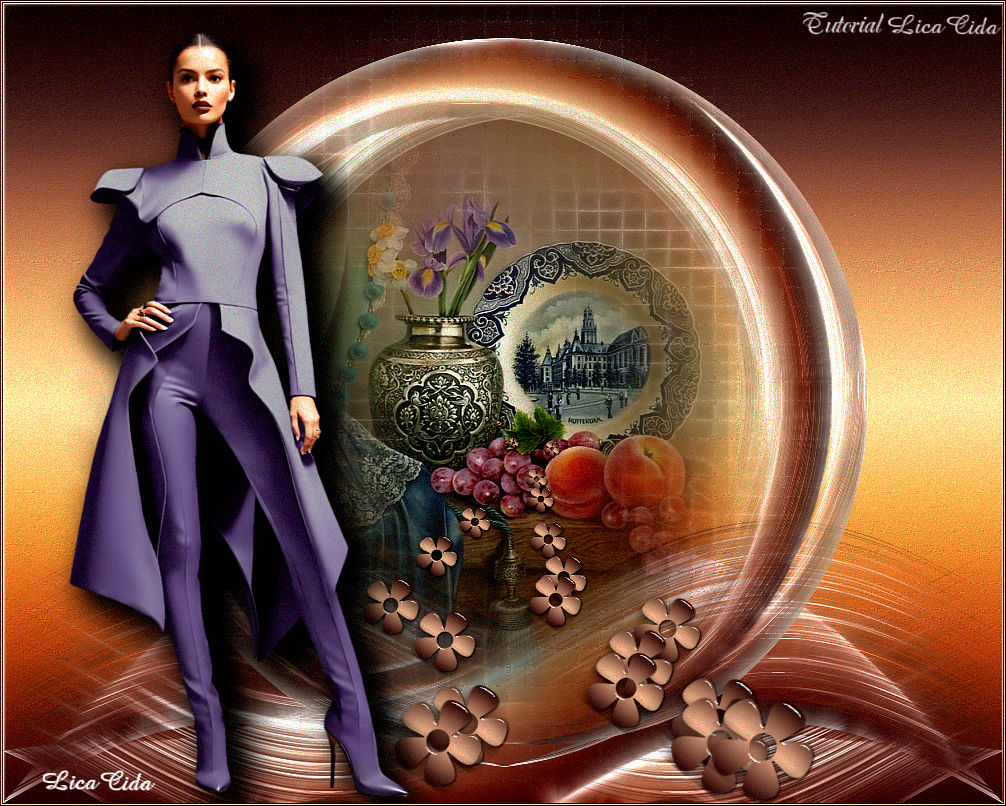
Two and One
TRADUÇÕES

MATERIAL

Preset: katrina (Eye Candy 5: Impact → Glass) --
Dê um duplo clique sobre o preset para importá-lo ao plugin.
Preset Shape: Flower 2 --
Copie o shape para a pasta Preset Shapes do PSP.
Anexo: flower 2 (a flor já pronta).
Tubes: SuizaBella_Ref_AG-003770
Callitubes-30stilllife
Mask: ildiko_design_mask_&_own_2016 (2)
Marca-d'água.
Efeitos do PSP.
PLUGINS
Plugin dsb flux → Blast
Plugin MuRa's Meister → Pole Transform
Plugin MuRa's Meister → Copies
Plugin Redfield → Fractalius
Plugin Nik Software → Color Efex Pro 3.0 → Bi-Color Filters
Plugin FM Tile Tools → Blend Emboss
Plugin Alien Skin Eye Candy 5: Impact → Glass
TUTORIAL
|
Esta seta marca sua linha
Clique e arraste para movê-la
|
|
1_.
Abra o material no PSP, duplique e feche o original.
Escolha duas cores para trabalhar: Foreground: #39110f (escura) — Background: #f8c39d (clara).
2_.
Abra uma nova imagem transparente de 1000 x 800 px.
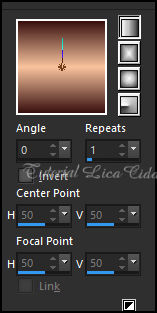
Pinte com o gradiente formado pelas cores em uso.
Configure: Style: Linear — Angle: 0 — Repeats: 1 — Invert desmarcado.
3_.
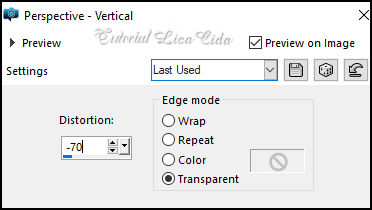
Effects → Geometric Effects → Perspective - Vertical.
4_.
Ative a régua e desça o efeito até 600 px.
Plugin dsb flux → Blast.
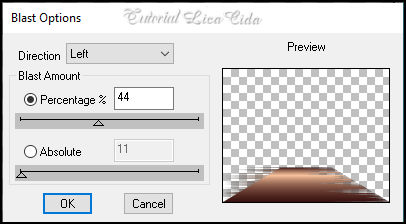
Image → Mirror → Mirror Horizontal.
5_.
Repita: Plugin dsb flux → Blast (veja o print acima).
6_.
Effects → Distortion Effects → Wave.
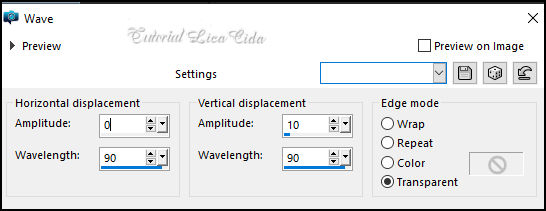
Layers → Duplicate.
Image → Mirror → Mirror Horizontal.
Layers → Merge → Merge Down.
Layers → Duplicate.
7_.
Plugin MuRa's Meister → Pole Transform.
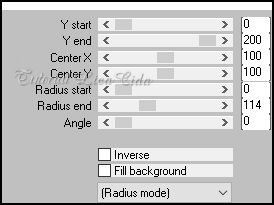
Image → Mirror → Mirror Vertical.
8_.
Layers → New Raster Layer.
Layers → Arrange → Send to Bottom.
Pinte com o gradiente formado pelas cores do item 1.
Layers → Duplicate.
9_.
Layers → New Mask Layer → From Image: ildiko_design_mask_&_own_2016 (2).
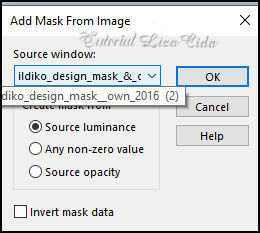
Effects → Edge Effects → Enhance.
Layers → Merge → Merge Group.
Effects → 3D Effects → Drop Shadow: 1 / 1 / 85 / 2,00 — Color: #000000.
10_.
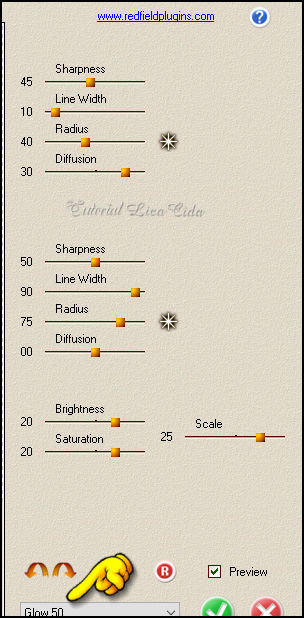
Plugin Redfield → Fractalius — Preset: Glow50.
11_.
Edit → Copy no tube Callitubes-30stilllife
Edit → Paste As New Layer.
Adjust → Sharpness → Sharpen.
Layers → Arrange → Bring to Top.
Layers → Duplicate.
Adjust → Blur → Gaussian Blur — Radius: 19,00.
12_.
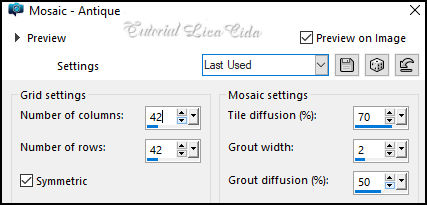
Effects → Texture Effects → Mosaic - Antique.
13_.
Plugin Redfield → Fractalius — Preset: Glow50.
Layers → Arrange → Move Down.
14_.
Ative a Raster 3, a layer do topo.
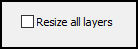
Image → Resize: 80% — Resize all layers desmarcado.
Effects → 3D Effects → Drop Shadow: 1 / 1 / 85 / 2,00 — Color: #000000.
LAYERS
15_.
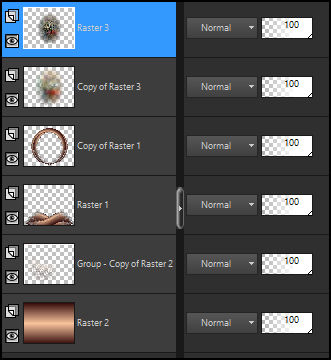
Plugin Redfield → Fractalius — Preset: Glow50.
Aplique na Raster 1 e na sua cópia.
16_.
Ative a Raster 2 (layer do fundo).
Layers → Duplicate.
Plugin Nik Software → Color Efex Pro 3.0 → Bi-Color Filters — Color Set: Cool/Warm 2.
Blend Mode: Overlay — Opacity: 65%.
17_.
Adjust → Add/Remove Noise → JPEG Artifact Removal (Maximum — C: 80).
Plugin FM Tile Tools → Blend Emboss.
18_.
Ative a layer do topo.
Layers → New Raster Layer.
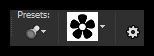
Ative a ferramenta Preset Shape e aplique o shape Flower 2 (segue no material).
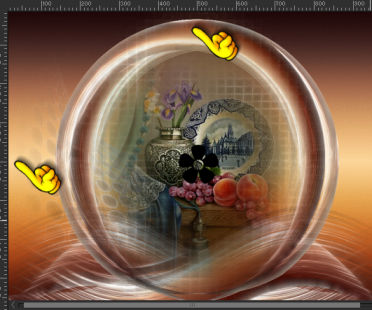
Selections → Select All.
Selections → Float.
Selections → Defloat.
Pinte a flor com o gradiente em uso.
A flor segue pronta no material, caso tenha dificuldade em fazê-la.
OBSERVAÇÃO
Se usar a flor pronta: Edit → Copy no flower 2 e Edit → Paste As New Layer. Ela cairá no lugar certo — elimine o item 19.
19_.
Plugin Alien Skin Eye Candy 5: Impact → Glass — Settings → User Settings: katrina (ou use a gosto).
Selections → Select None.
20_.
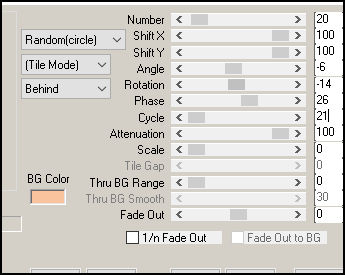
Plugin MuRa's Meister → Copies — Shower.
21_.
Edit → Copy no tube SuizaBella_Ref_AG-003770
Edit → Paste As New Layer.
Posicione e use a gosto.
Image → Add Borders: 1 px, Symmetric marcado — Color: #39110f (escura).
Image → Add Borders: 2 px, Symmetric marcado — Color: #f8c39d (clara).
Image → Add Borders: 1 px, Symmetric marcado — Color: #39110f (escura).
Aplique a marca-d'água.
Assine e salve.
File → Export → JPEG Optimizer.
Aparecida / LicaCida.
Rio de Janeiro - Brasil.

VOLTAR
Copyright ©2026 - Web Design - Naise Minas
|


