|
Thinking About
TRADUÇÕES

MATERIAL

Back inicial: arquivo
Back 2: back2colorido_lc
Tubes: Jeanne_Women_Rebecca_06_06_2022
calli_496 paisagem
Decor: decor_nmcriacoes_30
Textura: Corel_15_021
Flores: Callitubes-285flores
Marca-d'água.
Efeitos do PSP.
PLUGINS
Plugin dsb flux → Linear Transmission
Plugin Galaxy → Instant Mirror
Plugin Nik Software → Color Efex Pro 3.0 → Bi-Color Filters
Plugin MuRa's Meister → Perspective Tiling
Plugin Alien Skin Eye Candy 5: Impact → Perspective Shadow
Plugin AAA Frames → Foto Frame
TUTORIAL

|
Esta seta marca sua linha
Clique e arraste para movê-la
|
|
Configure: Foreground: #2e082d — Background: #8f7bae.
1_.
Forme um gradiente com as cores configuradas acima.
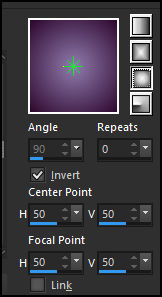
Configure: Style: Sunburst — Repeats: 0 — Invert marcado — Center Point: H: 50 / V: 50 — Focal Point: H: 50 / V: 50.
2_.
Abra o arquivo anexado (arquivo).
Ative a ferramenta Change To Target.
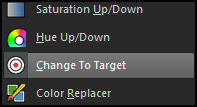
Pincele com o botão esquerdo, o que suavizará o efeito. Use o gradiente.
Configure:

Effects → Edge Effects → Enhance.
3_.
Layers → New Raster Layer.
Layers → Arrange → Send to Bottom.
4_.
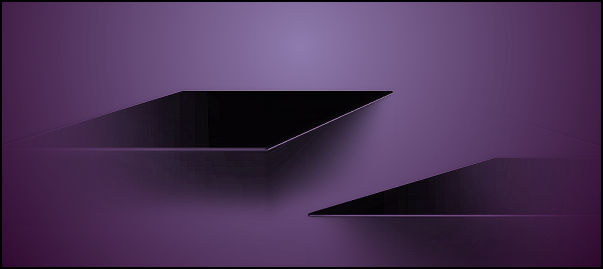
Plugin dsb flux → Linear Transmission.
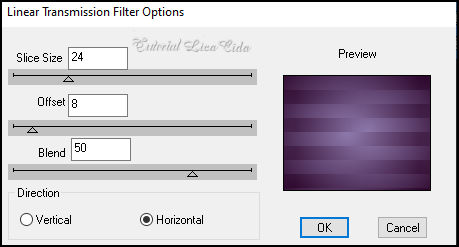
Effects → Edge Effects → Enhance More.
5_.
Plugin Galaxy → Instant Mirror — Crossing Top.
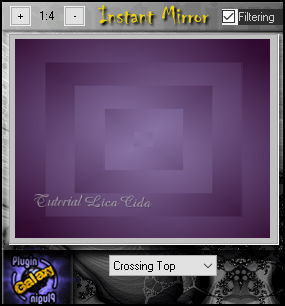
6_.
Ative a ferramenta Selection Tool (tecla S) → Custom Selection.
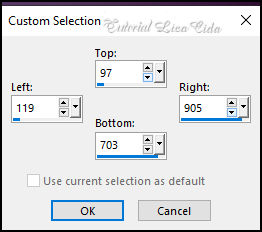
Selections → Invert.
Selections → Promote Selection to Layer.
7_.
Effects → 3D Effects → Inner Bevel.
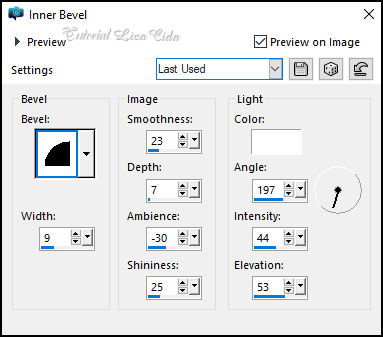
Selections → Select None.
8_.
Effects → Geometric Effects → Skew.
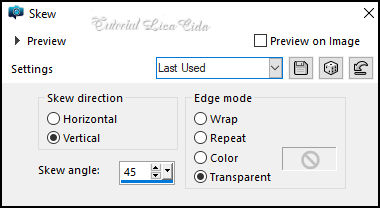
9_.
Effects → Distortion Effects → Pinch — Strength: 100%.
Layers → Duplicate.
Image → Mirror → Mirror Horizontal.
Layers → Merge → Merge Down.
10_.
Adjust → Add/Remove Noise → Add Noise.
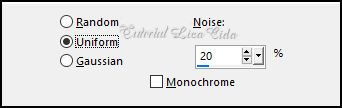
11_.
Ative a Raster 2 (layer inferior).
Effects → Texture Effects → Texture: Corel_15_021 (anexada).
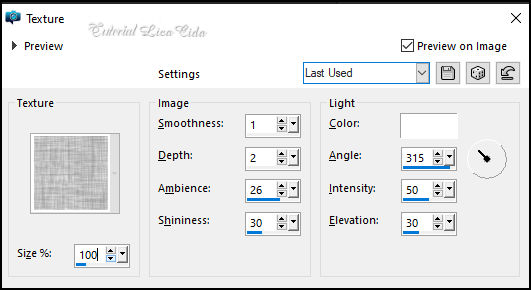
12_.
Layers → New Raster Layer.
Selections → Select All.
Edit → Copy no calli_496 paisagem
Edit → Paste Into Selection.
Selections → Select None.
13_.
Adjust → Blur → Radial Blur.
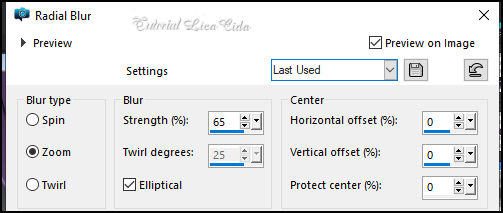
14_.
Effects → Distortion Effects → Pixelate.
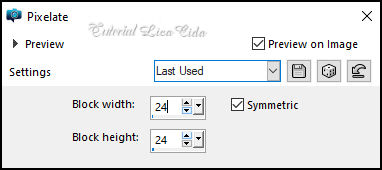
Effects → Edge Effects → Enhance More.
15_.
Layers → New Raster Layer.
Selections → Select All.
Edit → Copy no back2colorido_lc
Edit → Paste Into Selection.
Selections → Select None.
Effects → Edge Effects → Enhance More.
Layers → Arrange → Move Down.
16_.
Ative a Raster 3.
Edit → Copy no calli_496 paisagem
Edit → Paste As New Layer.
Posicione, redimensione e aplique Drop Shadow a gosto.
17_.
Plugin Nik Software → Color Efex Pro 3.0 → Bi-Color Filters — Color Set: Brown 1 — Default.
18_.
Edit → Copy no decor_nmcriacoes_30
Edit → Paste As New Layer.
Layers → Arrange → Move Up.
Duplique. Já está posicionado.
LAYERS
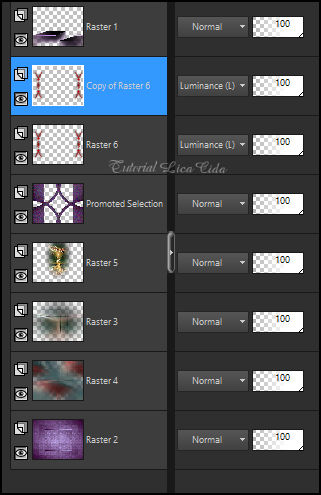
19_.
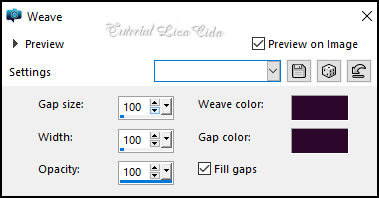
Duplique a Raster 2.
Effects → Texture Effects → Weave — Color: #2e082d.
20_.
Plugin MuRa's Meister → Perspective Tiling.
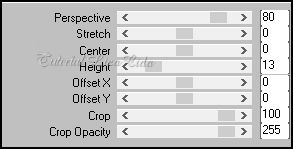
21_.
Adjust → Add/Remove Noise → Add Noise (print do item 10).
Use abaixo da layer Promoted Selection.
Adjust → Sharpness → Sharpen.
Adjust → Sharpness → Sharpen.
Plugin Alien Skin Eye Candy 5: Impact → Perspective Shadow — a gosto, nos efeitos desejados.
22_.
Ative a layer do topo.
Edit → Copy no Callitubes-285flores
Edit → Paste As New Layer.
Posicione, redimensione e aplique Drop Shadow a gosto.
Edit → Copy no tube Jeanne_Women_Rebecca_06_06_2022
Edit → Paste As New Layer.
Posicione, redimensione e aplique Drop Shadow a gosto.
23_.
Image → Add Borders: 2 px, Symmetric marcado — Color: #2e082d (cor escura).
Image → Add Borders: 2 px, Symmetric marcado — Color: #8f7bae (cor clara).
Image → Add Borders: 2 px, Symmetric marcado — Color: #2e082d (cor escura).
Selections → Select All.
Edit → Copy.
Image → Add Borders: 50 px, Symmetric marcado — Color: #ffffff.
Selections → Invert.
Edit → Paste Into Selection.
Adjust → Blur → Gaussian Blur — Radius: 20,00.
Effects → Texture Effects → Texture (print do item 11).
Adjust → Add/Remove Noise → Add Noise (print do item 10).
Selections → Invert.
Effects → 3D Effects → Drop Shadow: 0 / 0 / 100 / 50,00 — Color: #000000.
Selections → Select None.
24_.
Plugin AAA Frames → Foto Frame: Width: 25 — demais valores Default.
Repita o efeito.
Image → Add Borders: 1 px, Symmetric marcado — Color: #000000.
Aplique a marca-d'água.
Assine e salve.
Image → Resize: Width 1024 px.
Espero que apreciem.
Obrigada!
Aparecida / LicaCida, março de 2023.
Rio de Janeiro - Brasil.

VOLTAR
Copyright ©2026 - Web Design - Naise Minas
|


