|
Regina
DEDICATÓRIA
Parabéns, querida amiga, pelo seu aniversário!
TRADUÇÕES

MATERIAL

Preset katrina (marapontes) do Eye Candy 5: Impact → Glass
Dê duplo clique sobre o preset para importá-lo ao plugin.
Preset Illumination → Lights → 2bllc
Salvar na pasta Presets do PSP (My PSP Files).
Tube: 3996-luzcristina
Elementos deco: elemento deco1lc / elemento deco2lc / elemento deco3lc
Marca-d'água.
Efeitos do PSP.
Versão usada: PSP X7.
PLUGINS
Plugin Toadies → Weaver
Plugin Simple → Blintz / Left Right Wrap / To Left Mirror
Plugin Graphics Plus → Vertical Mirror
Plugin Alien Skin Eye Candy 5: Impact → Glass / Perspective Shadow
Plugin Nik Software → Color Efex Pro 3.0 → Cross Balance
Plugin AAA Filters → Landscape
TUTORIAL
|
Esta seta marca sua linha
Clique e arraste para movê-la
|
|
1_.
Abra uma nova imagem transparente de 950 x 650 px.
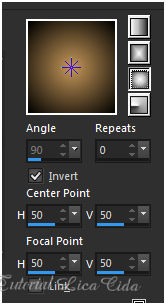
Pinte com o gradiente formado por duas cores contrastantes, retiradas do tube principal: #000000 e #c59759.
Configure: Style: Sunburst — Repeats: 0 — Invert marcado — Center Point: H: 50 / V: 50 — Focal Point: H: 50 / V: 50.
2_.
Selections → Select All.
Edit → Copy no tube 3996-luzcristina
Edit → Paste Into Selection.
Selections → Select None.
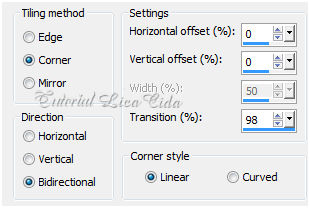
Effects → Image Effects → Seamless Tiling.
3_.
Plugin Toadies → Weaver: 120 / 100 / 222.
Layers → Duplicate.
4_.
Ative a ferramenta Pick Tool e suba o back a 200 px.
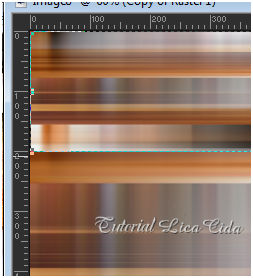
Plugin Simple → Blintz.
5_.
Plugin Graphics Plus → Vertical Mirror: 13 / 0.
Effects → Reflection Effects → Rotating Mirror: Horizontal Offset: 0 / Rotation Angle: 0 — Reflect.
6_.
Layers → New Raster Layer.
Pinte com o mesmo gradiente formado no item 1.
Selections → Select All.
Selections → Modify → Contract: 40.
Delete.
Selections → Invert.
7_.
Effects → 3D Effects → Inner Bevel.
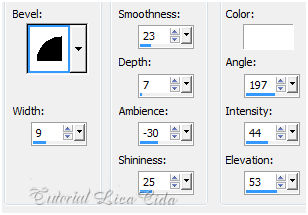
Selections → Select None.
Image → Resize: 80%.
8_.
Plugin Simple → Left Right Wrap.
Layers → Arrange → Move Down.
9_.
Ative a layer superior (Copy of Raster 1).
Image → Resize: 80%.
Plugin Alien Skin Eye Candy 5: Impact → Glass — Settings: Use Settings → katrina.
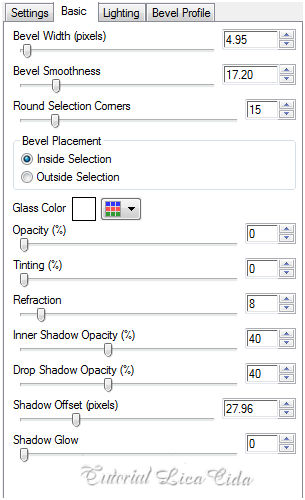
Layers → Duplicate.
Image → Resize: 50%.
Repita: Image → Resize: 70%.
10_.
Effects → Image Effects → Offset.
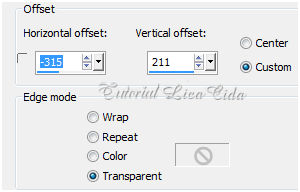
Plugin Simple → To Left Mirror.
11_.
Plugin Alien Skin Eye Candy 5: Impact → Perspective Shadow — Preset: Blurry.
Repita nas duas layers abaixo (efeitos).
12_.
Ative a Raster 2.
Edit → Copy no elemento deco1lc
Edit → Paste As New Layer.
13_.
Edit → Copy no elemento deco2lc
Edit → Paste As New Layer.
14_.
Ative a layer Copy of Raster 1.
Effects → Illumination Effects → Lights → Preset: 2bllc.
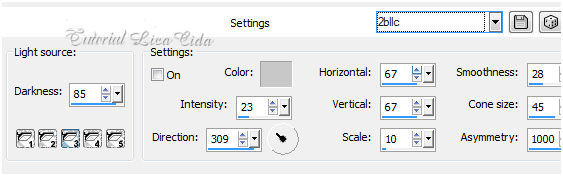
Repita o preset na Raster 1.
Layers → Duplicate.
15_.
Plugin Nik Software → Color Efex Pro 3.0 → Cross Balance (Opacity: 50%).
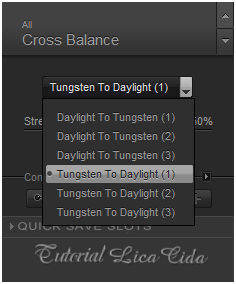
Layers — Blends — Opacitys (use a gosto).
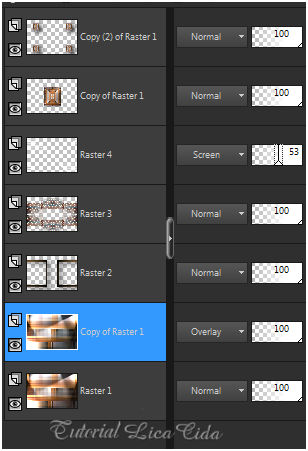
16_.
Ative a Raster 4.
Ative a ferramenta Selection Tool (tecla S) → Custom Selection.
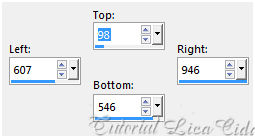
Layers → New Raster Layer.
Edit → Copy no elemento deco3lc (arquivonet)
Edit → Paste Into Selection.
Selections → Select None.
Adjust → Sharpness → Sharpen More.
17_.
Image → Add Borders: 1 px, Symmetric marcado — Color: #c59759.
Image → Add Borders: 10 px, Symmetric marcado — Color: #000000.
Image → Add Borders: 1 px, Symmetric marcado — Color: #c59759.
Image → Add Borders: 30 px, Symmetric marcado — Color: #000000.
Image → Add Borders: 1 px, Symmetric marcado — Color: #c59759.
Image → Add Borders: 10 px, Symmetric marcado — Color: #000000.
18_.
Edit → Copy no tube 3996-luzcristina
Edit → Paste As New Layer.
Posicione.
Adjust → Sharpness → Sharpen More.
Image → Add Borders: 1 px, Symmetric marcado — Color: #c59759.
Image → Add Borders: 10 px, Symmetric marcado — Color: #000000.
Image → Add Borders: 1 px, Symmetric marcado — Color: #c59759.
19_.
Plugin AAA Filters → Landscape.
Aplique a marca-d'água.
Assine e salve.
Espero que gostem.
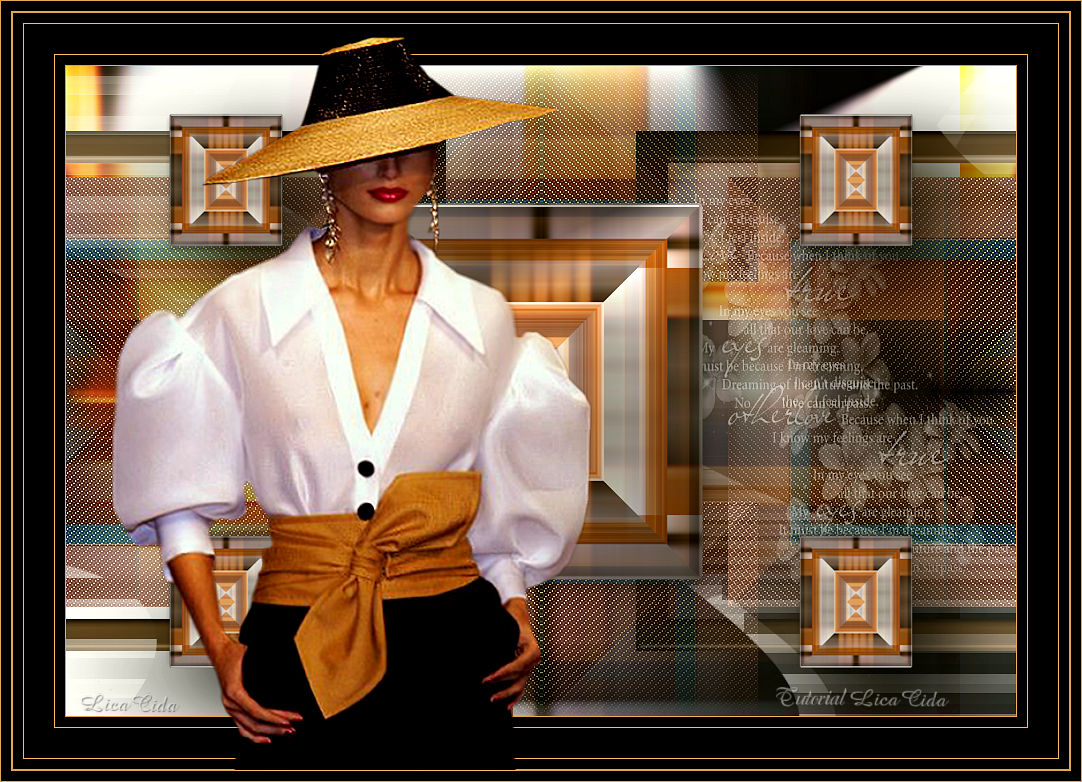
Tutorial criado por Aparecida / LicaCida, fevereiro de 2016.
Rio de Janeiro - Brasil.


VOLTAR
Copyright ©2026 - Web Design - Naise Minas
|

