|
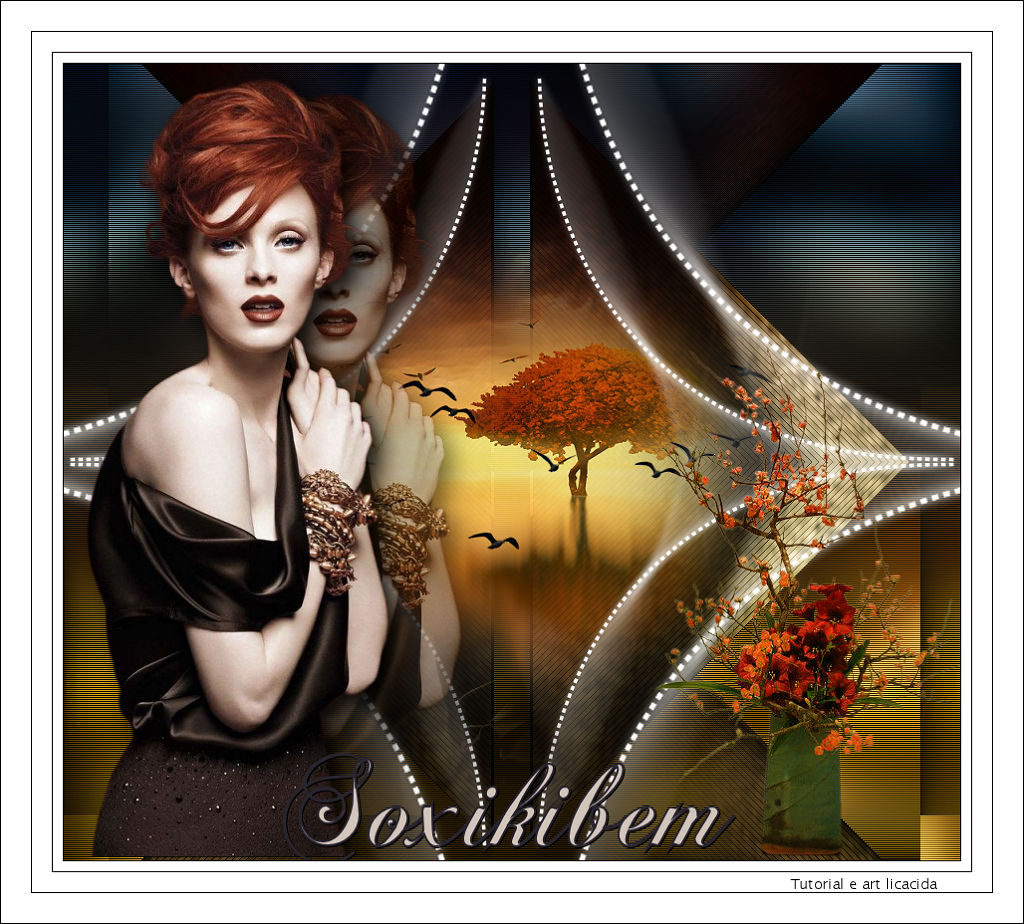
Soxikibem
TRADUÇÕES

MATERIAL

Preset: Preset_CloneBrush_aplicatubelica --
Salvar na pasta Presets do PSP.
Tubes: 061MulherByPqnaAlice
040PaisagemByPqnaAlice
arquivo net_aves
Callitubes-162flores (1)
Deco: decosoxikibem1_lc
Textura: Corel_15_024
Título: TítuloSoxikibem_bylicacida
Marca-d'água.
Efeitos do PSP.
Versão usada: PSP X9.
PLUGINS
Plugin Unplugged Tools → Interface
Plugin Simple → Top Left Mirror
Plugin Alien Skin Eye Candy 5: Impact → Motion Trail
Plugin Nik Software → Color Efex Pro 3.0 → Bi-Color Filters
Plugin AAA Filters → Custom (opcional)
TUTORIAL
|
Esta seta marca sua linha
Clique e arraste para movê-la
|
|
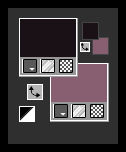
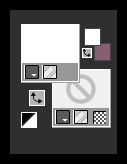
Configure: Foreground: #1a1216 — Background: #875f71.
1_.
Abra uma nova imagem transparente de 900 x 800 px.
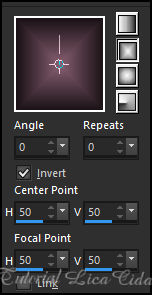
Pinte com o gradiente formado pelas cores configuradas acima.
Configure: Style: Rectangular.
2_.
Selections → Select All.
Edit → Copy no 061MulherByPqnaAlice
Edit → Paste Into Selection.
Selections → Select None.
3_.
Effects → Image Effects → Seamless Tiling: Default.
Adjust → Blur → Gaussian Blur — Radius: 24,00.
4_.
Effects → Texture Effects → Weave — Colors: #000000 e #875f71 (Background).
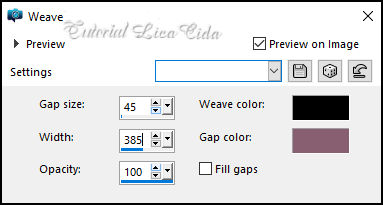
5_.
Plugin Unplugged Tools → Interface.
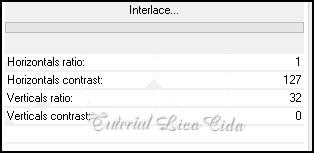
6_.
Com a ferramenta Selection Tool (tecla S), selecione o quadrado como mostra o print.
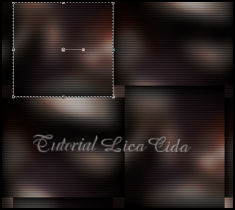
Selections → Promote Selection to Layer.
7_.
Effects → Texture Effects → Texture: Corel_15_024 (no material).
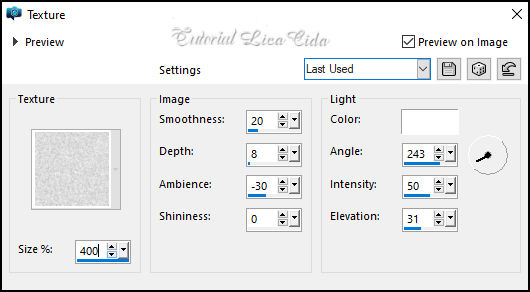
Selections → Select None.
8_.
Effects → Image Effects → Seamless Tiling.
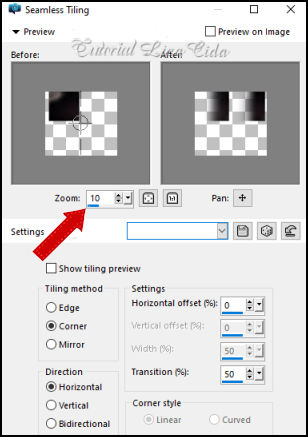
9_.
Effects → Geometric Effects → Skew.
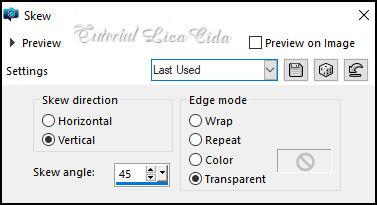
Layers → Duplicate.
Image → Mirror → Mirror Horizontal.
Layers → Merge → Merge Down.
10_.
Plugin Simple → Top Left Mirror.
11_.
Layers → New Raster Layer.
Ative a ferramenta Pen Tool (tecla V).


Line Style: Diamond.
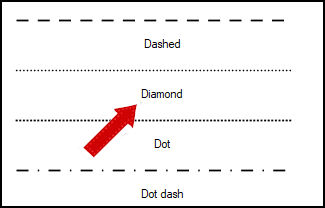
Configure: Foreground: #ffffff — Background: transparente.
Trace uma linha como indicado no print.
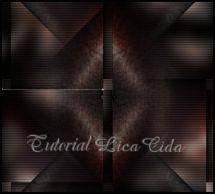
Clique na parte indicada do quadrado; aparecerá o efeito desejado (na mesma layer).
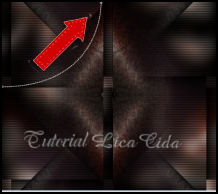
12_.
Plugin Alien Skin Eye Candy 5: Impact → Motion Trail.
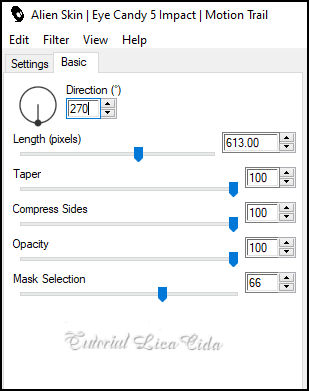
Layers → Duplicate.
Image → Mirror → Mirror Horizontal.
Layers → Merge → Merge Down.
Layers → Duplicate.
Image → Mirror → Mirror Vertical.
Layers → Merge → Merge Down.
13_.
Layers → Duplicate.
Image → Resize: 150% — Resize all layers desmarcado.
Layers → Merge → Merge Down.
O efeito das laterais poderá sair diferente, conforme observei nas versões testadas.
14_.
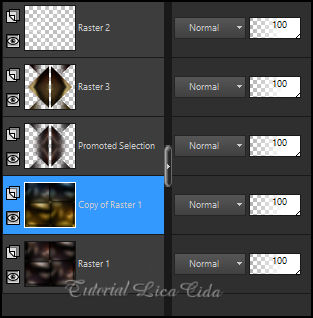
Ative a layer Promoted Selection.
Edit → Copy no decosoxikibem1_lc
Edit → Paste As New Layer.
15_.
Ative a Raster 1.
Layers → Duplicate.
Plugin Nik Software → Color Efex Pro 3.0 → Bi-Color Filters — Color Set: Cool/Warm 1 (Default).
LAYERS
16_.
Ative a Raster 3.
Edit → Copy no 040PaisagemByPqnaAlice
Edit → Paste As New Layer.
Adjust → Sharpness → Sharpen.
Image → Resize: 80% — Resize all layers desmarcado.
Posicione a gosto.
17_.
Edit → Copy no arquivo net_aves
Edit → Paste As New Layer.
18_.
Ative a layer do topo.
Edit → Copy no tube 061MulherByPqnaAlice
Edit → Paste As New Layer.
Adjust → Sharpness → Sharpen.
Image → Resize: 80% — Resize all layers desmarcado.
Posicione a gosto.
19_.
Layers → New Raster Layer.
Ative a ferramenta Clone Brush com o preset aplicatubelica.
Caso não consiga salvar o preset no seu PSP, observe as configurações:
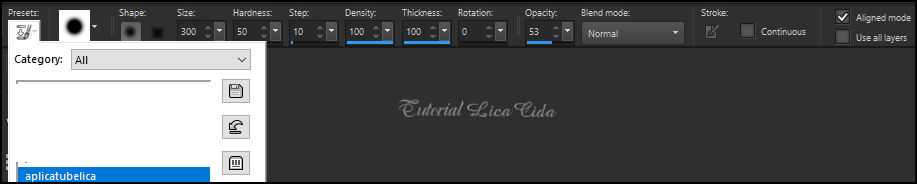
Clone o tube usado (061MulherByPqnaAlice, com Resize de 80%).
Apliquei ao lado do tube original. Use à vontade.
Layers → Arrange → Move Down.
20_.
Opcional: aplique no tube clonado o Plugin AAA Filters → Custom → Landscape — Default.
21_.
Edit → Copy no Callitubes-162flores (1)
Edit → Paste As New Layer.
Posicione.
22_.
Edit → Copy no TítuloSoxikibem_bylicacida
Edit → Paste As New Layer.
Posicione à sua escolha.
BORDAS
Image → Add Borders: 1 px, Symmetric marcado — Color: #1a1216 (Foreground).
Image → Add Borders: 10 px, Symmetric marcado — Color: #ffffff.
Image → Add Borders: 1 px, Symmetric marcado — Color: #1a1216 (Foreground).
Image → Add Borders: 20 px, Symmetric marcado — Color: #ffffff.
Image → Add Borders: 1 px, Symmetric marcado — Color: #1a1216 (Foreground).
Image → Add Borders: 30 px, Symmetric marcado — Color: #ffffff.
Image → Add Borders: 1 px, Symmetric marcado — Color: #1a1216 (Foreground).
Aplique a marca-d'água.
Assine e salve.
Espero que apreciem.
Aparecida / LicaCida, setembro de 2022.
Rio de Janeiro - Brasil.


VOLTAR
Copyright ©2026 - Web Design - Naise Minas
|


