|
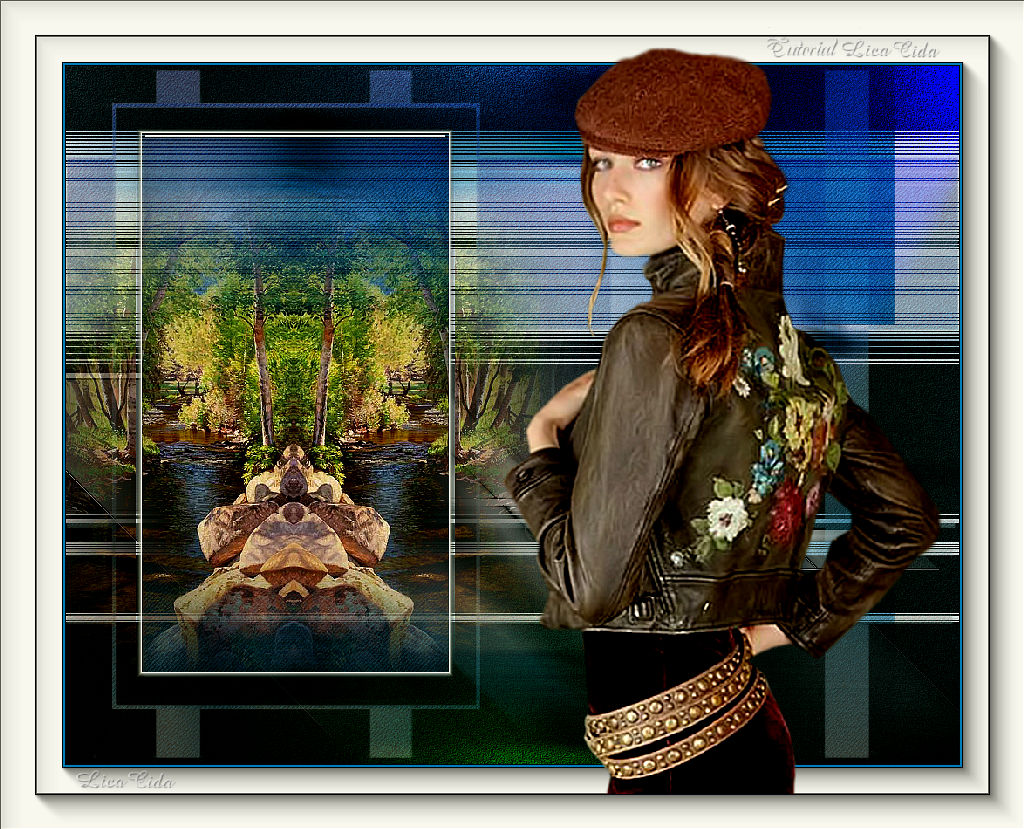
Sabrina Fashion
TRADUÇÕES

MATERIAL

Preset: katrina, do Eye Candy 5: Impact → Glass --
Dê um duplo clique sobre o preset para importá-lo ao plugin.
Preset: Illumination → Lights → Preset_Lights_memories --
Salvar na pasta Presets do PSP.
Tubes: 4086-luzcristina
4235-luzcristina
Masks: masque94
!!!!gradientedworisch
Marca-d'água.
Efeitos do PSP.
Versão usada: PSP X8.
PLUGINS
Plugin Carolaine and Sensibility → CS-DLines
Plugin VM Extravaganza
Plugin Mehdi → Weaver
Plugin Alien Skin Eye Candy 5: Impact → Glass
Plugin AAA Frames → Foto Frame
Plugin AAA Filters → Custom
Plugin FM Tile Tools → Blend Emboss
Plugin Nik Software → Color Efex Pro 3.0 → Bi-Color Filters
TUTORIAL
|
Esta seta marca sua linha
Clique e arraste para movê-la
|
|
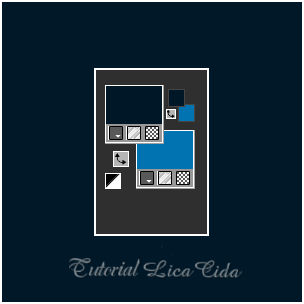
Configure: Foreground: #001828 — Background: #0073b0.
1_.
Abra uma nova imagem transparente de 1024 x 800 px.
Pinte com a cor do Foreground: #001828.
2_.
Layers → New Raster Layer.
Pinte com a cor do Background: #0073b0.
3_.
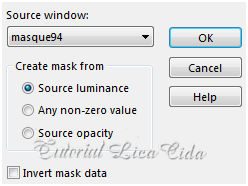
Layers → New Mask Layer → From Image: masque94.
Layers → Merge → Merge Group.
Adjust → Add/Remove Noise → Add Noise.
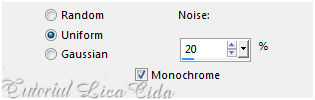
4_.
Plugin Carolaine and Sensibility → CS-DLines — Default (40 / 5).
Image → Flip.
5_.
Ative a ferramenta Selection Tool (tecla S) → Custom Selection.
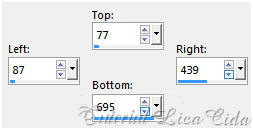
Selections → Promote Selection to Layer.
Selections → Select None.
Effects → Image Effects → Seamless Tiling — Default.
Layers → New Mask Layer → From Image: !!!!gradientedworisch, para suavizar o efeito.
Layers → Merge → Merge Group.
6_.
Ative a Group-Raster 2.
Plugin VM Extravaganza.
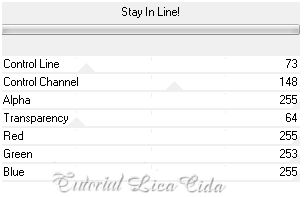
7_.
Ative a ferramenta Selection Tool (tecla S) → Custom Selection.
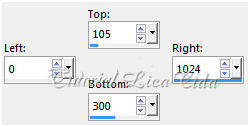
Selections → Modify → Select Selection Borders.
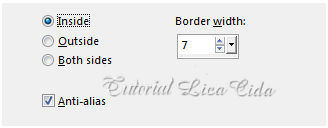
Layers → New Raster Layer.
Pinte com a cor #ffffff — Opacity: 100%.
Selections → Select None.
Layers → Arrange → Bring to Top.
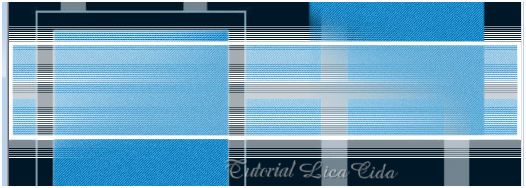
Pinte o restante da seleção com a cor #ffffff — Opacity: 28%.
Estará assim:
8_.
Effects → Geometric Effects → Circle — Transparent.
9_.
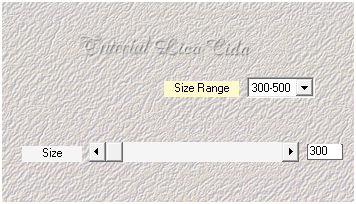
Plugin Mehdi → Weaver.
10_.
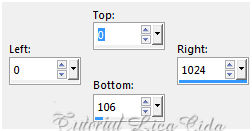
Ative a ferramenta Selection Tool (tecla S) → Custom Selection.
11_.
Layers → New Raster Layer.
Pinte com o gradiente formado pelas cores configuradas acima.
Configure: Style: Sunburst — Repeats: 0 — Invert marcado — Center Point: H: 50 / V: 50 — Focal Point: H: 50 / V: 50 — Opacity: 100%.
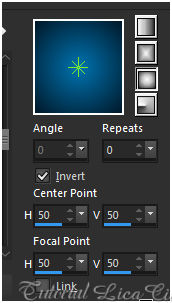
Selections → Select None.
12_.
Effects → Texture Effects → Mosaic - Antique.
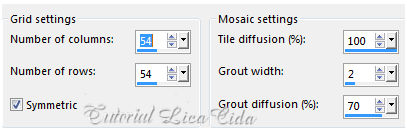
Effects → Edge Effects → Enhance More.
Layers → Duplicate.
Image → Flip.
Layers → Merge → Merge Down.
Repita o item 8 (Effects → Geometric Effects → Circle — Transparent).
Repita o item 9 (Plugin Mehdi → Weaver, veja o print).
Adjust → Blur → Motion Blur — Angle: 289,00 — Strength: 100.
Effects → Edge Effects → Enhance More.
13_.
Repita a Custom Selection do item 5.
Edit → Copy no tube 4235-luzcristina
Edit → Paste As New Layer.
Posicione a gosto.
14_.
Plugin Alien Skin Eye Candy 5: Impact → Glass — Settings: katrina.
Effects → 3D Effects → Chisel — Color: #ffffff.
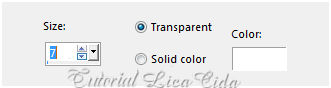
Selections → Select None.
Plugin AAA Filters → Custom — Landscape.
15_.
Ative a Raster 1.
Adjust → Add/Remove Noise → JPEG Artifact Removal — Maximum: 89.
Plugin FM Tile Tools → Blend Emboss.
16_.
Effects → Illumination Effects → Lights → Preset_Lights_memories.
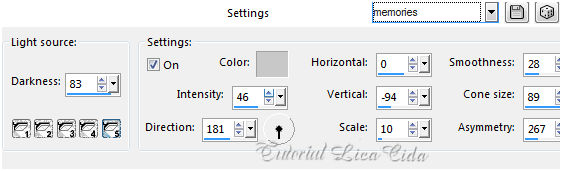
17_.
Ative a Group-Raster 2.
Plugin Nik Software → Color Efex Pro 3.0 → Bi-Color Filters — Color Set: Violet/Pink 4.
Layers → Duplicate.
18_.
Ative a Raster 2.
Effects → Geometric Effects → Skew: -45 — Horizontal — Transparent.
Objects → Align → Bottom.
Effects → Edge Effects → Enhance More.
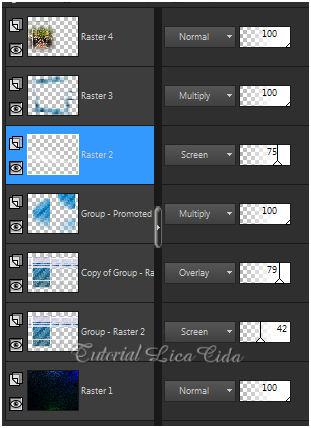
Altere os Blend Modes e a Opacity das layers.
19_.
Image → Add Borders: 1 px, Symmetric marcado — Color: cor do Foreground.
Image → Add Borders: 2 px, Symmetric marcado — Color: cor do Background.
Image → Add Borders: 1 px, Symmetric marcado — Color: cor do Foreground.
Image → Add Borders: 30 px, Symmetric marcado — Color: #ffffff.
Selecione a borda.
20_.
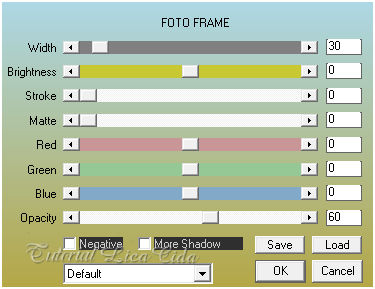
Plugin AAA Frames → Foto Frame.
Selections → Select None.
21_.
Edit → Copy no tube 4086-luzcristina
Edit → Paste As New Layer.
22_.
Image → Add Borders: 1 px, Symmetric marcado — Color: cor do Foreground.
Image → Add Borders: 40 px, Symmetric marcado — Color: #ffffff.
Selecione a borda.
23_.
Plugin AAA Frames → Foto Frame — Width: 40.
Selections → Select None.
Plugin AAA Filters → Custom — Landscape.
OBSERVAÇÃO
O trabalho deverá ser reduzido para 1024 px de largura.
Aplique a marca-d'água.
Assine e salve.
Espero que gostem. Obrigada!
Aparecida / LicaCida, junho de 2016.
Rio de Janeiro - Brasil.

VOLTAR
Copyright ©2026 - Web Design - Naise Minas
|

