|
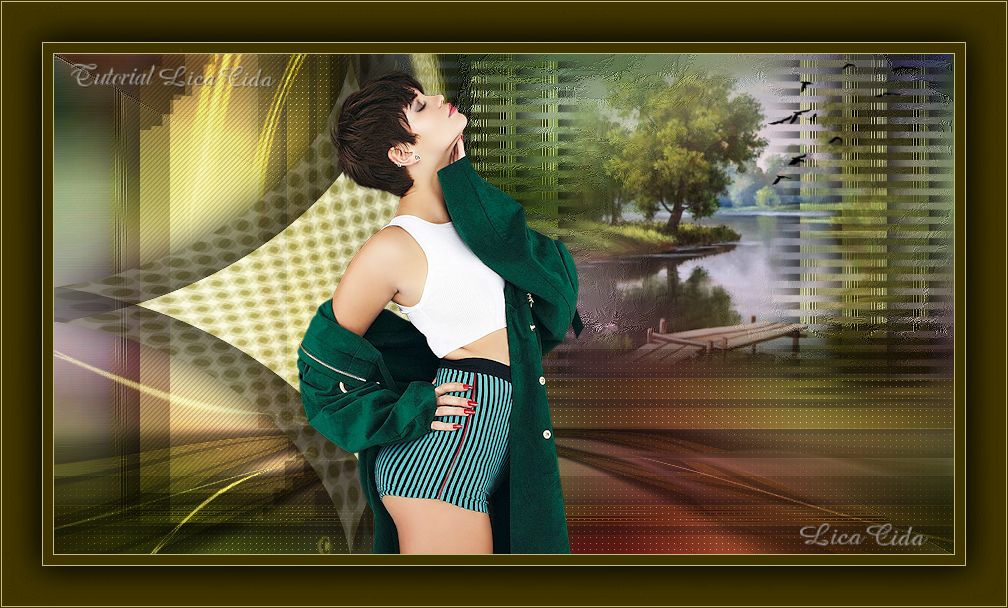
Mulher
DEDICATÓRIA
Dedico à querida amiga Maria José Prado, pelo seu aniversário e também pelo Dia Internacional da Mulher!
TRADUÇÕES

MATERIAL

Seleções: imagemalphachannel — Selection #1, Selection #2 e Selection #3
(Salvas no canal alfa da imagem imagemalphachannel.)
Tubes: Tocha24441
Ponton_etang_CibiBijoux
passaros
Decorações: persianaslc
acabamentolc
acabamentolc2
Back: backfinallc
Marca-d'água.
Efeitos do PSP.
Versão usada: PSP X6.
PLUGINS
Plugin Toadies → Weaver
Plugin MuRa's Seamless → Mirror Diagonal
Plugin FFG → S
Plugin Carolaine and Sensibility → CS-LDots
Plugin Carolaine and Sensibility → CS-DLines
Plugin VanDerLee → UnPlugged-X
Plugin MuRa's Meister → Copies
TUTORIAL
|
Esta seta marca sua linha
Clique e arraste para movê-la
|
|
1_.
Abra a imagem transparente imagemalphachannel (anexada), faça uma cópia e minimize a original.
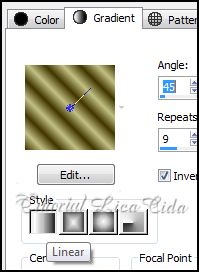
Pinte com o gradiente formado pelas cores #c2c083 e #403500.
Configure: Style: Linear — Angle: 45 — Repeats: 9 — Invert marcado.
2_.
Plugin Toadies → Weaver.
3_.
Plugin MuRa's Seamless → Mirror Diagonal: 120.
4_.
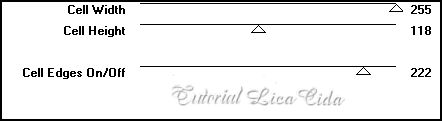
Plugin FFG → S.
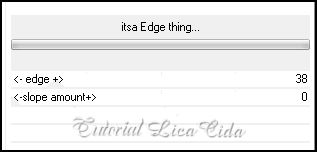
Effects → Edge Effects → Enhance.
5_.
Selections → Load/Save Selection → Load Selection From Alpha Channel → Selection #1.
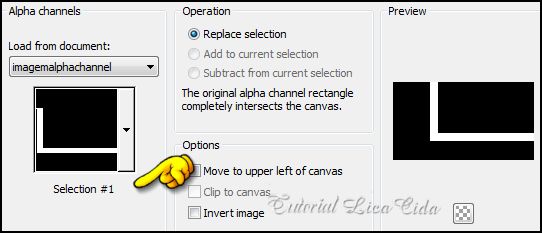
Selections → Promote Selection to Layer.
6_.
Effects → 3D Effects → Drop Shadow: 0 / 0 / 80 / 50,00 — Color: #000000.
Selections → Select None.
7_.
Plugin Carolaine and Sensibility → CS-LDots.
8_.
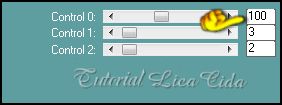
Plugin VanDerLee → UnPlugged-X → Defocus: 6.
Layers → Duplicate.
9_.
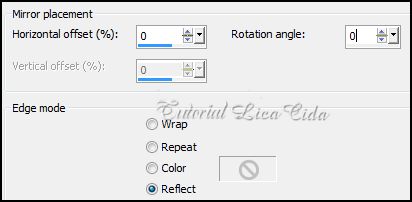
Effects → Reflection Effects → Rotating Mirror.
10_.
Effects → Image Effects → Offset: 0 / -127 — Custom e Transparent marcados.
Layers → Merge → Merge Down.
11_.
Layers → New Raster Layer.
Plugin VanDerLee → UnPlugged-X — Color: #c2c083.
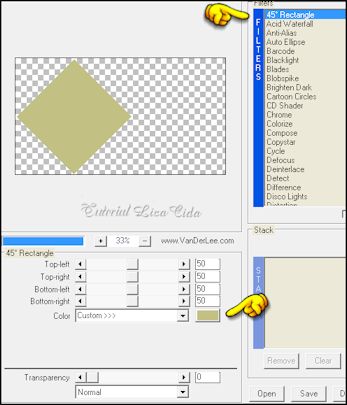
12_.
Effects → Artistic Effects → Halftone — Cores: #403500 e #ffffff.
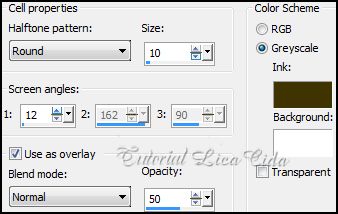
13_.
Plugin VanDerLee → UnPlugged-X → Defocus: 6.
14_.
Effects → Distortion Effects → Pinch — Strength: 100.
15_.
Effects → 3D Effects → Drop Shadow: 0 / 0 / 80 / 50,00 — Color: #000000.
16_.
Selections → Load/Save Selection → Load Selection From Alpha Channel → Selection #2.
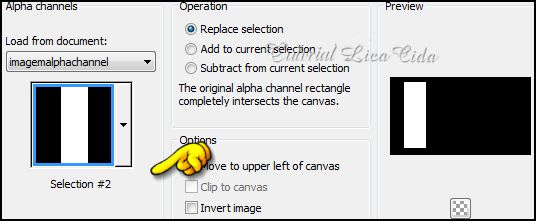
Layers → New Raster Layer.
Pinte com a cor #c2c083.
Selections → Select None.
17_.
Plugin MuRa's Meister → Copies: Free Fall — valores Default.
18_.
Plugin VanDerLee → UnPlugged-X → Defocus: 6.
19_.
Plugin Carolaine and Sensibility → CS-DLines — Default (40 / 5).
Image → Flip.
Layers → Arrange → Move Down.
20_.
Effects → 3D Effects → Drop Shadow: 0 / 0 / 80 / 50,00 — Color: #000000.
21_.
Ative a Raster 1.
Selections → Load/Save Selection → Load Selection From Alpha Channel → Selection #3.
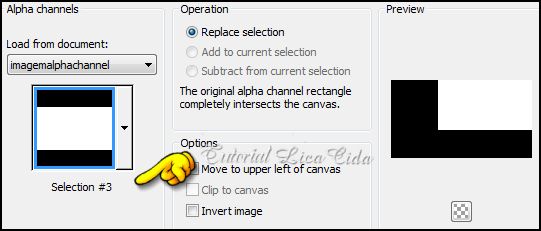
Selections → Promote Selection to Layer.
Selections → Select None.
22_.
Effects → Art Media Effects → Brush Strokes — Color: #403500.
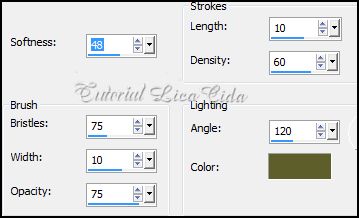
LAYERS
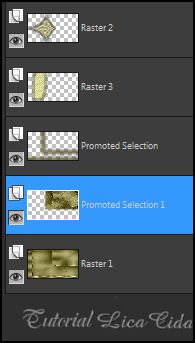
23_.
Edit → Copy no tube Ponton_etang_CibiBijoux (paisagem)
Edit → Paste As New Layer.
Image → Resize: 80% (duas vezes).
Posicione.
Opcional: decore a gosto (usei passaros, que segue anexado).
24_.
Edit → Copy no persianaslc
Edit → Paste As New Layer.
25_.
Effects → Image Effects → Offset: 175 / 60 — Custom e Transparent marcados.
OPCIONAL
Trabalhando a profundidade da tag.
26_.
Layers → New Raster Layer.
Layers → Arrange → Send to Bottom.
Selections → Select All.
Edit → Copy no backfinallc
Edit → Paste Into Selection.
Selections → Select None.
LAYERS
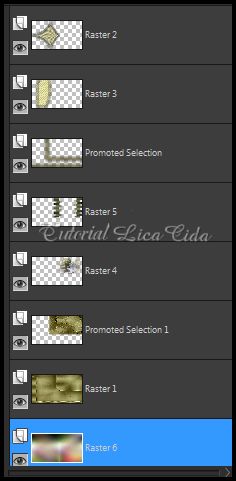
Altere os Blend Modes e a Opacity das layers.
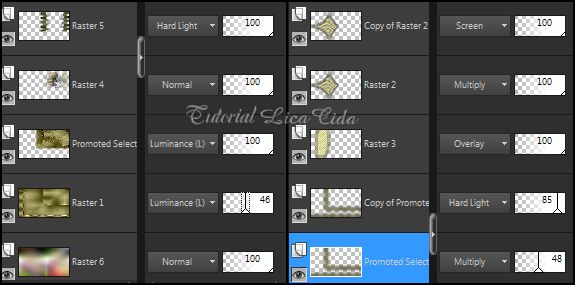
27_.
Ative a layer Copy of Promoted Selection.
Edit → Copy no acabamentolc
Edit → Paste As New Layer.
Blend Mode: Screen — Opacity: 100%.
28_.
Edit → Copy no acabamentolc2
Edit → Paste As New Layer.
Blend Mode: Hard Light — Opacity: 75%.
29_.
Effects → Image Effects → Offset: 0 / -128 — Custom e Transparent marcados.
30_.
Ative a layer superior (Copy of Raster 2).
Edit → Copy no tube Tocha24441
Edit → Paste As New Layer.
Image → Resize: 80% (três vezes).
Posicione.
31_.
Image → Add Borders: 1 px — Symmetric marcado — Color: #c2c083.
Image → Add Borders: 10 px — Symmetric marcado — Color: #403500.
Image → Add Borders: 1 px — Symmetric marcado — Color: #c2c083.
32_.
Image → Add Borders: 40 px — Symmetric marcado — Color: #403500.
Selecione a borda com a ferramenta Magic Wand.
Selections → Invert.
33_.
Effects → 3D Effects → Drop Shadow: 0 / 0 / 80 / 50,00 — Color: #000000.
Selections → Select None.
34_.
Image → Add Borders: 1 px — Symmetric marcado — Color: #c2c083.
Image → Add Borders: 1 px — Symmetric marcado — Color: #403500.
Aplique a marca-d'água.
Assine e salve.
Espero que gostem.
Aparecida / LicaCida, março de 2014.
Rio de Janeiro - Brasil.

VOLTAR
Copyright ©2026 - Web Design - Naise Minas
|


