|

Lady Luz
TRADUÇÕES

MATERIAL

Seleções: licacidasel3
licacidasel4 --
Salvar na pasta Selections do PSP.
Tubes: 3472-luzcristina
3433-luzcristina
SvB Stil leven met tulpen
Decoração: deco1lc
deco2lc
Brush: 31
Marca-d'água.
Efeitos do PSP.
Versão usada: PSP X8.
PLUGINS
Plugin AP [Lines] → Lines - SilverLining
Plugin Graphics Plus → Vertical Mirror
Plugin Carolaine and Sensibility → cs_texture
Plugin Nik Software → Color Efex Pro 3.0 → Bi-Color Filters
Plugin Mehdi → Weaver
TUTORIAL

|
Esta seta marca sua linha
Clique e arraste para movê-la
|
|
1_.
Abra uma nova imagem transparente de 950 x 650 px.
Pinte com o gradiente formado pelas cores #b1a975 e #000000.
Configure: Style: Linear — Angle: 0 — Repeats: 1 — Invert marcado.

Layers → Duplicate.
2_.
Effects → Geometric Effects → Skew.

Selections → Select All.
Selections → Float.
Selections → Defloat.
Tecle Delete.
Selections → Invert.
Pinte com o gradiente formado no item 1.
Selections → Select None.
3_.
Plugin AP [Lines] → Lines - SilverLining.

Layers → Duplicate.
4_.
Plugin Graphics Plus → Vertical Mirror — Default.
Effects → Reflection Effects → Rotating Mirror: Horizontal Offset: 0 / Rotation Angle: 0 — Reflect.
Layers → Duplicate.
5_.
Effects → Image Effects → Seamless Tiling.

Effects → 3D Effects → Drop Shadow: 13 / -15 / 85 / 50,00 — Color: #000000.
6_.
Ative a Copy (2) of Raster 1.
Com a ferramenta Magic Wand (Default), selecione o efeito interno.
Selections → Invert.
Effects → Image Effects → Seamless Tiling — Default.
Selections → Select None.
7_.
Selections → Load/Save Selection → Load Selection From Disk → licacidasel3.
Ative a Raster 1.
Selections → Promote Selection to Layer.
8_.
Plugin Carolaine and Sensibility → cs_texture.
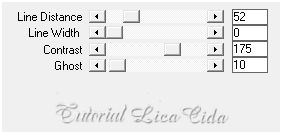
Selections → Select None.
9_.
Edit → Copy no deco1lc
Edit → Paste As New Layer.
Layers → Arrange → Bring to Top.
10_.
Ative a Raster 1.
Layers → Duplicate.
Plugin Nik Software → Color Efex Pro 3.0 → Bi-Color Filters — Color Set: Cool/Warm 1.
11_.
Selections → Load/Save Selection → Load Selection From Disk → licacidasel4.
Selections → Promote Selection to Layer.
Layers → Arrange → Bring to Top.
Selections → Select None.
Layers → Duplicate.
Image → Mirror.
Layers → Merge → Merge Down.
12_.
Effects → Geometric Effects → Perspective - Vertical.

Layers → Duplicate.
Image → Flip.
Layers → Merge → Merge Down.
13_.
Plugin Mehdi → Weaver.

14_.
Ative a Copy (3) of Raster 1.
Layers → Duplicate.
Na layer original (Copy (3) of Raster 1), aplique:
Plugin Nik Software → Color Efex Pro 3.0 → Bi-Color Filters — Color Set: Cool/Warm 1.
Altere os Blend Modes e a Opacity das layers.


15_.
Ative a layer superior (Promoted Selection 1).
Edit → Copy no tube 3433-luzcristina
Edit → Paste As New Layer.
Decore a gosto.
Adjust → Sharpness → Sharpen.
Blend Mode: Color (use a gosto, para realçar o efeito inferior).
16_.
Edit → Copy no deco2lc
Edit → Paste As New Layer.
17_.
Image → Add Borders: 1 px, Symmetric marcado — Color: #b1a975.
Image → Add Borders: 2 px, Symmetric marcado — Color: #000000.
Image → Add Borders: 1 px, Symmetric marcado — Color: #b1a975.
18_.
Image → Add Borders: 20 px, Symmetric marcado — Color: #000000.
19_.
Image → Add Borders: 1 px, Symmetric marcado — Color: #b1a975.
Image → Add Borders: 2 px, Symmetric marcado — Color: #000000.
Image → Add Borders: 1 px, Symmetric marcado — Color: #b1a975.
20_.
Image → Add Borders: 20 px, Symmetric marcado — Color: #000000.
21_.
Selections → Select All.
Selections → Modify → Contract: 48 px.
Selections → Invert.
22_.
Effects → Texture Effects → Weave (cores acima).

Selections → Select None.
23_.
Edit → Copy no tube 3472-luzcristina
Edit → Paste As New Layer.
Posicione.
24_.
Edit → Copy no brush 31 (Raster 2)
Edit → Paste As New Layer.
Posicione.
25_.
Edit → Copy no tube SvB Stil leven met tulpen
Edit → Paste As New Layer.
Redimensione e posicione a gosto.
26_.
Image → Add Borders: 1 px, Symmetric marcado — Color: #000000.
Image → Resize: 950 px de largura (Width).
Aplique a marca-d'água.
Assine e salve.
Espero que gostem.
Aparecida / LicaCida, novembro de 2015.
Rio de Janeiro - Brasil.


VOLTAR
Copyright ©2026 - Web Design - Naise Minas
|

