|
Joaquina Mercedes
DEDICATÓRIA
Com carinho!
TRADUÇÕES

MATERIAL

Preset: Illumination → Lights → Preset_Lights_curves --
Salvar na pasta Presets do PSP.
Preset "amaze" (a-to-b.cfg, no arquivo sinedots !!-plugin): descompacte para a pasta do Plugin DragonFly → Sinedots II.
Abra o Sinedots II → Open e os presets aparecerão.
Plugin AbstractCurves: AbstractCurves_Setup1190 (anexado).
Tubes: tube3228_mulher_mara_pontes
Paysage misted jewel 028
anna.br_paisagem-by-rhigel.1_31-07-10
anna.br_transparent-flower_26-11-10
Decos: deco1lc
deco -perspectivelc
Mask: Mask_herbe
Efeitos anexados (arquivo efeitos).
Marca-d'água.
Efeitos do PSP.
Versão usada: PSP X8.
PLUGINS
Plugin FunHouse → Loom
Plugin AbstractCurves → AbstractCurves (anexado)
Plugin DragonFly → Sinedots II (preset anexado)
Plugin Transparency → Eliminate Black
Plugin MuRa's Seamless → Emboss at Alpha
Plugin Toadies → Weaver
Plugin AAA Frames → Foto Frame
Plugin AAA Filters → Custom
TUTORIAL
|
Esta seta marca sua linha
Clique e arraste para movê-la
|
|
Configure: Foreground: #d0cdcc — Background: #524b55.
1_.
Abra uma nova imagem transparente de 1000 x 700 px.
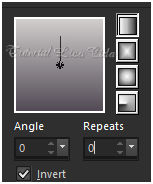
Pinte com o gradiente formado pelas cores acima.
Configure: Style: Linear — Angle: 0 — Repeats: 0 — Invert marcado.
2_.
Selections → Select All.
Edit → Copy no Paysage misted jewel 028
Edit → Paste Into Selection.
Selections → Select None.
Effects → Image Effects → Seamless Tiling — Default.
3_.
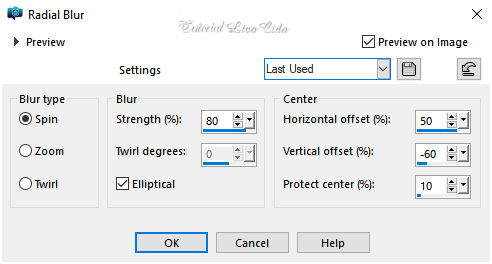
Adjust → Blur → Radial Blur.
4_.
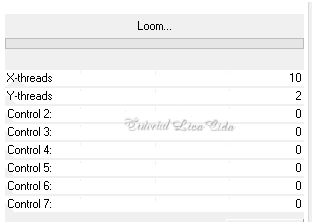
Plugin FunHouse → Loom — Default.
5_.
Layers → New Raster Layer.
Use a cor do Foreground: #d0cdcc.
Plugin AbstractCurves → AbstractCurves → Lines&Stripes (19) → Vertical lines (efeito no anexo).

6_.
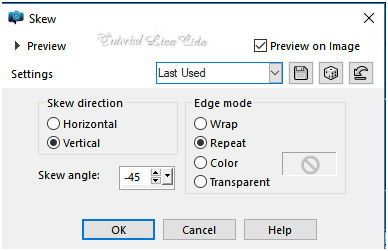
Effects → Geometric Effects → Skew.
7_.
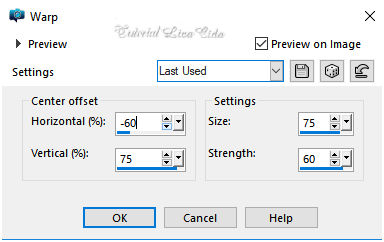
Effects → Distortion Effects → Warp.
8_.
Effects → Distortion Effects → Pinch — Strength: 100%.
9_.
Effects → Reflection Effects → Rotating Mirror — Horizontal Offset: 0 — Rotation Angle: 180 — Repeat.
Plugin MuRa's Seamless → Emboss at Alpha — Default.
Layers → Duplicate.
Image → Mirror → Mirror Vertical.
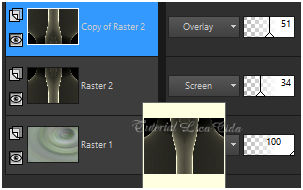
As layers Raster 2 e Copy of Raster 2 devem ficar assim:
10_.
Layers → New Raster Layer (na Copy of Raster 2).
Pinte com a cor #000000.
Plugin DragonFly → Sinedots II — preset "amaze" (efeito no anexo).
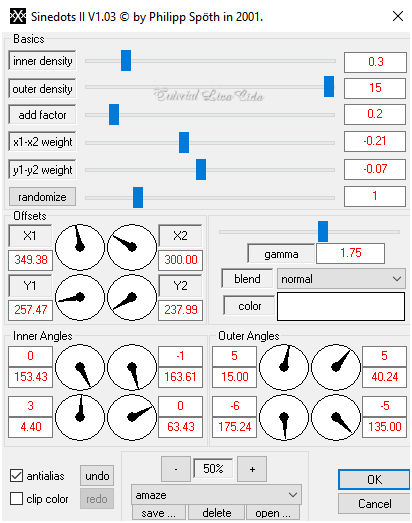
Plugin Transparency → Eliminate Black.
Effects → 3D Effects → Drop Shadow: 1 / 1 / 80 / 2,00 — Color: #000000.
11_.
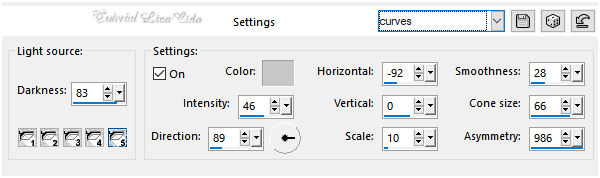
Effects → Illumination Effects → Lights → Preset_Lights_curves.
12_.
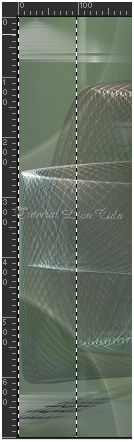
View → Rulers (ative a régua).
Com a ferramenta Selection Tool (tecla S), selecione como no modelo, de 100 a 120 px.
Layers → New Raster Layer.
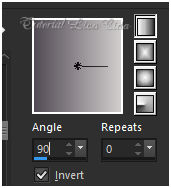
Pinte com o gradiente formado no item 1, mudando o Angle para 90.
Selections → Select None.
13_.
Plugin Toadies → Weaver — Default (59 / 48 / 222).
14_.
Effects → Geometric Effects → Skew (mudando para Transparent).
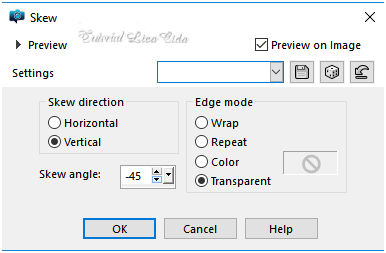
Layers → Duplicate.
Image → Mirror → Mirror Horizontal.
Layers → Merge → Merge Down.
Effects → Edge Effects → Enhance More.
Layers → Duplicate.
Image → Mirror → Mirror Vertical.
Layers → Merge → Merge Down.
15_.
Effects → Distortion Effects → Pinch — Strength: 100%.
16_.
Edit → Copy no deco1lc
Edit → Paste As New Layer.
Blend Mode: Screen.
Layers → Arrange → Move Down.
Altere os Blend Modes e a Opacity das layers (use a gosto).
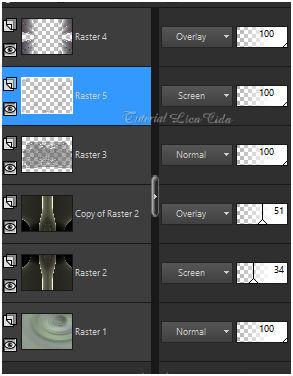
17_.
Ative a Raster 1.
Edit → Copy no deco -perspectivelc
Edit → Paste As New Layer.
Objects → Align → Bottom.
18_.
Escolha um misted para usar sobre esse chão: anna.br_paisagem-by-rhigel.1_31-07-10.
Layers → New Mask Layer → From Image: Mask_herbe.
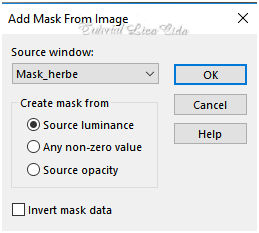
Layers → Merge → Merge Group.
Copie o chão retirado da mask.
Edit → Paste As New Layer.
Posicione a gosto, sobre a layer superior (Raster 4).
19_.
Edit → Copy no anna.br_transparent-flower_26-11-10 (Raster 1)
Edit → Paste As New Layer.
Posicione.
20_.
Edit → Copy no tube tube3228_mulher_mara_pontes
Edit → Paste As New Layer.
Posicione.
21_.
Acima da Copy of Raster 2:
Edit → Copy no Paysage misted jewel 028
Edit → Paste As New Layer.
Image → Mirror → Mirror Horizontal.
Objects → Align → Right.
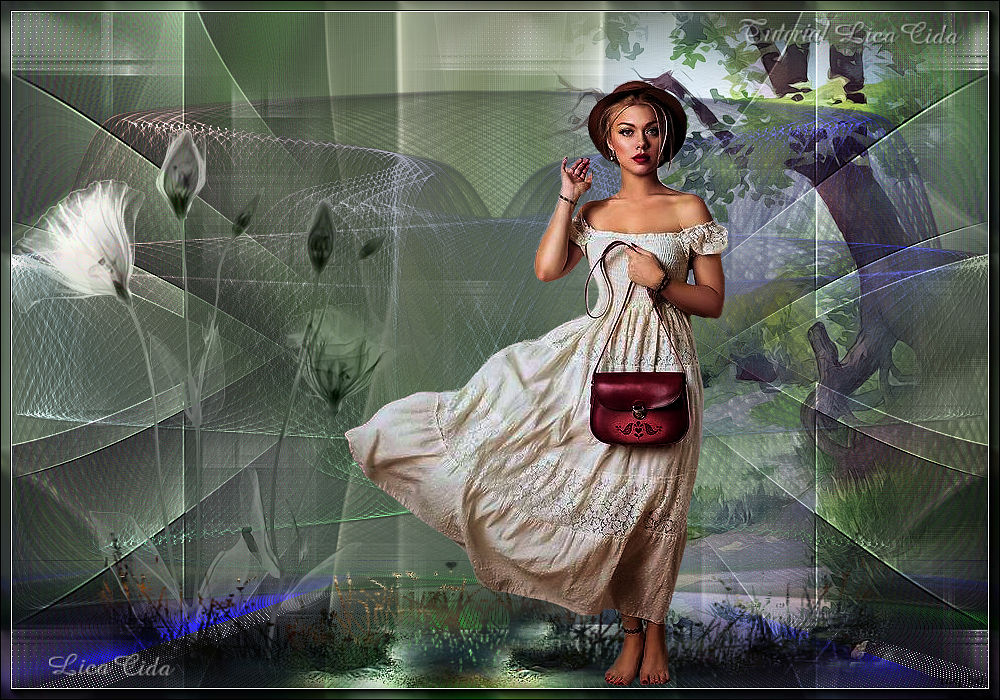
Layers → Merge → Merge All (Flatten).
22_.
Plugin AAA Frames → Foto Frame — Width: 10 — Matte: 1 (restante Default).
Opcional: Plugin AAA Filters → Custom — Sharp (Default).
Aplique a marca-d'água.
Assine e salve.
Espero que gostem.
Aparecida / LicaCida, julho de 2018.
Rio de Janeiro - Brasil.

VOLTAR
Copyright ©2026 - Web Design - Naise Minas
|


