|
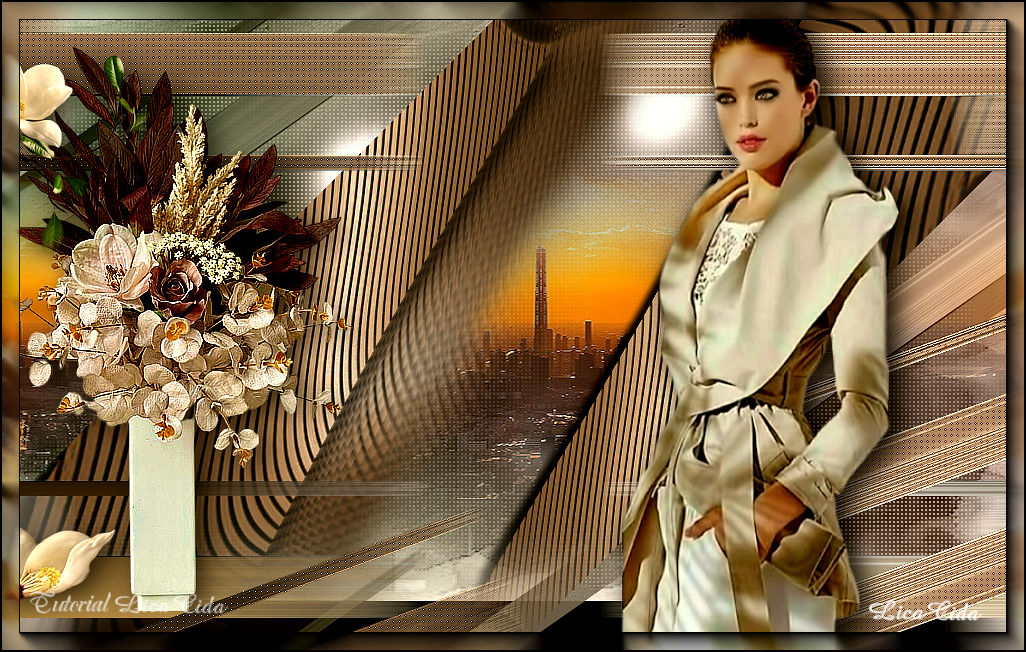
Femme Urbaine
TRADUÇÕES

MATERIAL

Seleção: femmeurbaine_ by lc --
Salvar na pasta Selections do PSP.
Tubes: Callitubes-3154mulheres
121PaisagemByPqnaAlice
Callitubes-277flores (1)
Callitubes-314flores
Masks: !b
!!!!.mask.ket-fadesuave
Decor (by lc): decocentral-lc
decofinal-lc
Marca-d'água.
Efeitos do PSP.
PLUGINS
Plugin MuRa's Seamless → Emboss at Alpha
Plugin Carolaine and Sensibility → CS-LDots
Plugin VM Stylize → Motion Trail Wild
Plugin Nik Software → Color Efex Pro 3.0 → Bi-Color Filters
Plugin AAA Filters → Custom
Plugin AAA Frames → Foto Frame
TUTORIAL
|
Esta seta marca sua linha
Clique e arraste para movê-la
|
|
1_.
Abra o material no PSP, duplique e feche os originais.
Escolha duas cores para trabalhar: Foreground: #2e1e10 — Background: #c19c5d.
2_.
Abra uma nova imagem transparente de 1024 x 600 px.
Pinte com a cor do Foreground: #2e1e10.
3_.
Layers → New Raster Layer.
Pinte com o gradiente formado pelas cores em uso.
Configure: Style: Radial — Angle: 250 — Repeats: 15 — Center Point: H: 0 / V: 50.
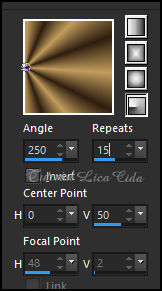
Adjust → Blur → Gaussian Blur — Radius: 22,00.
4_.
Adjust → Add/Remove Noise → Add Noise.
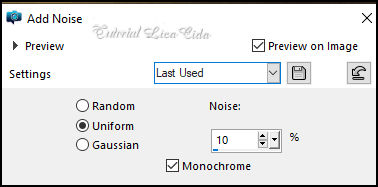
Layers → Duplicate.
Retire a visibilidade da layer original (Raster 2).
Vamos trabalhar na cópia.
5_.
Layers → New Mask Layer → From Image: !b.
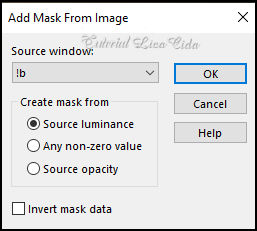
Effects → Edge Effects → Enhance.
Layers → Merge → Merge Group.
Plugin MuRa's Seamless → Emboss at Alpha: Default.
6_.
Image → Canvas Size: 1024 x 650 — Bottom: 50.
Effects → 3D Effects → Drop Shadow: 1 / 1 / 100 / 1,00 — Color: #c19c5d (Background).
7_.
Effects → Texture Effects → Weave (cores em uso).
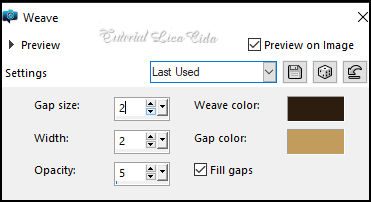
Layers → New Raster Layer.
8_.
Selections → Load/Save Selection → Load Selection From Disk → femmeurbaine_ by lc.
9_.
Pinte com o gradiente formado pelas cores em uso.
Configure: Style: Linear — Angle: 0 — Repeats: 1.
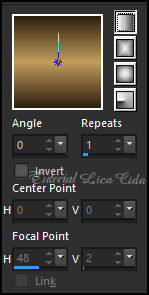
Selections → Select None.
10_.
Effects → Image Effects → Offset.
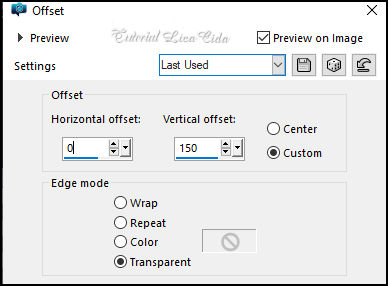
Effects → 3D Effects → Drop Shadow: 1 / 1 / 100 / 1,00 — Color: #000000.
Layers → Duplicate.
Image → Mirror → Mirror Horizontal.
Layers → Merge → Merge Down.
11_.
Plugin VM Stylize → Motion Trail Wild: Default (o efeito também se encontra em outros plugins).
Layers → Duplicate.
Image → Mirror → Mirror Vertical.
12_.
Ative a Raster 3.
Plugin Carolaine and Sensibility → CS-LDots.
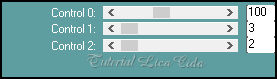
Effects → Edge Effects → Enhance.
13_.
Ative a Copy of Raster 3.
Layers → Duplicate.
Effects → Geometric Effects → Skew.
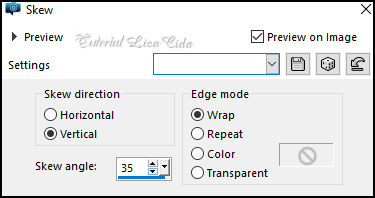
Effects → 3D Effects → Drop Shadow: 1 / 1 / 100 / 1,00 — Color: #000000.
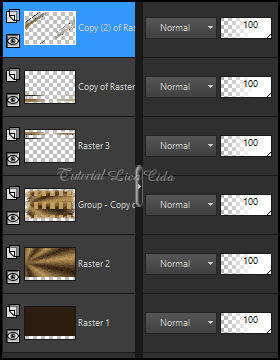
As layers estão assim:
14_.
Layers → New Raster Layer (layer do topo).
Escolha duas cores contrastantes para formar um back. Usei Foreground: #7e8772 — Background: #5b423a.
Pinte essa layer com o gradiente: Style: Linear — Angle: 90 — Repeats: 0.
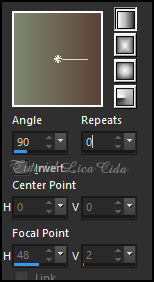
Blend Mode: Color (L).
OBSERVAÇÃO
Fique à vontade para mudar os Blend Modes de acordo com as cores que estiver usando.
15_.
Ative novamente a visibilidade da Raster 2 e ative essa layer.
Layers → Duplicate.
Plugin VM Stylize → Motion Trail Wild: Default.
16_.
Effects → Geometric Effects → Skew (print do item 13).
17_.
Plugin Nik Software → Color Efex Pro 3.0 → Bi-Color Filters — Color Set: Moss 2 — Default.
Blend Mode: Overlay.
18_.
Ative a layer do topo.
Layers → New Raster Layer.
Effects → Artistic Effects → Balls and Bubbles.
Shape:
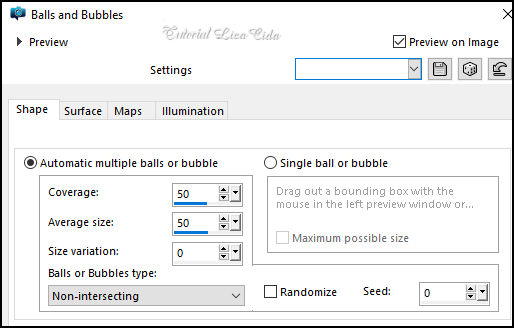
Blend Mode: Screen.
19_.
Edit → Copy no tube 121PaisagemByPqnaAlice
Edit → Paste As New Layer.
20_.
Effects → Image Effects → Seamless Tiling — Side by side.
Com a ferramenta Pick Tool, centralize sua paisagem (se necessário).
21_.
Edit → Copy no decocentral-lc
Edit → Paste As New Layer.
Ative a Raster 3 e sua cópia: Layers → Arrange → Bring to Top.
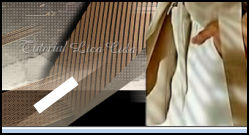
Use a mask !!!!.mask.ket-fadesuave onde indico, para suavizar o efeito.
Layers → Merge → Merge Group.
22_.
Edit → Copy no decofinal-lc
Edit → Paste As New Layer.
23_.
Edit → Copy no tube Callitubes-314flores
Edit → Paste As New Layer.
Posicione a gosto. Uso opcional.
24_.
Edit → Copy no tube Callitubes-277flores (1)
Edit → Paste As New Layer.
Posicione.
Aplique um Drop Shadow como desejar.
25_.
Edit → Copy no tube Callitubes-3154mulheres
Edit → Paste As New Layer.
Posicione.
Aplique um Drop Shadow como desejar.
26_.
Layers → Merge → Merge Visible.
27_.
Plugin AAA Filters → Custom → Landscape: Default.
28_.
Plugin AAA Frames → Foto Frame — Width: 18, demais valores Default.
Aplique a marca-d'água.
Assine e salve.
File → Export → JPEG Optimizer.
Aparecida / LicaCida, julho de 2023.
Rio de Janeiro - Brasil.

VOLTAR
Copyright ©2026 - Web Design - Naise Minas
|


