|

Falling in Love
TRADUÇÕES

MATERIAL

Tubes: Beauty_in_lilac_by_CibiBijoux
Paysage misted jewel 030
Decos: Ildiko_create_deco (15)
Ildiko_create_deco (152)
decolc
Corner: pixelcorners03-st-mel
Texto: text
Masks: Narah_Mask_1004
Narah_mask_0544
Marca-d'água.
Efeitos do PSP.
Versão usada: PSP X8.
PLUGINS
Plugin Mehdi → Sorting Tiles
Plugin VM Toolbox → Zoom Blur
Plugin Toadies → What Are You?
Plugin AP [Lines] → Lines - SilverLining
Plugin Alien Skin Eye Candy 5: Impact → Perspective Shadow
Plugin VanDerLee → UnPlugged-X → Defocus
Plugin AAA Filters → Custom (opcional)
TUTORIAL
|
Esta seta marca sua linha
Clique e arraste para movê-la
|
|
Configure: Foreground: #e8f1f6 (clara) — Background: #716277 (escura).
1_.
Abra uma nova imagem transparente de 950 x 650 px.
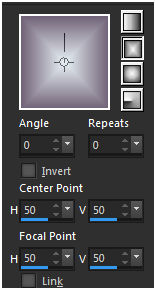
Pinte com o gradiente formado pelas cores acima.
Configure: Style: Rectangular — Angle: 0 — Repeats: 0 — Invert desmarcado — Center Point: H: 50 / V: 50 — Focal Point: H: 50 / V: 50.
2_.
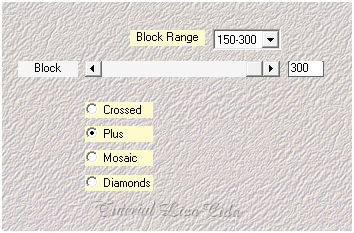
Plugin Mehdi → Sorting Tiles.
Effects → Reflection Effects → Rotating Mirror: H: 0 / R: 180 — Repeat.
Effects → Edge Effects → Enhance.
3_.
Layers → New Raster Layer.
Pinte com a cor do Background: #716277 (escura).
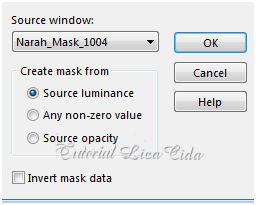
Layers → New Mask Layer → From Image: Narah_Mask_1004.
Effects → User Defined Filter → Emboss_3.
Layers → Merge → Merge Group.
4_.
Effects → Geometric Effects → Perspective - Vertical: Distortion: 100 — Wrap.
5_.
Plugin VM Toolbox → Zoom Blur — Default (39 / 60).
Effects → User Defined Filter → Emboss_3.
6_.
Ative a ferramenta Selection Tool (tecla S) → Custom Selection 1.
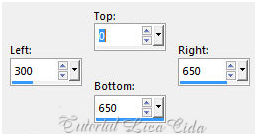
Selections → Invert.
Pressione a tecla Delete.
Selections → Invert.
7_.
Ative a Raster 1.
Layers → New Raster Layer.
Pinte com a cor do Foreground: #e8f1f6 (clara).
Selections → Select None.
Plugin Toadies → What Are You?: 28 / 0.
Effects → User Defined Filter → Emboss_3.
Plugin Alien Skin Eye Candy 5: Impact → Perspective Shadow — Blurry.
8_.
Ative a ferramenta Selection Tool (tecla S) → Custom Selection 2.
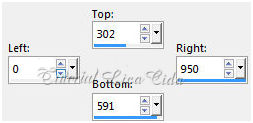
Ative a Raster 1.
Layers → New Raster Layer.
Pinte com a cor do Background: #716277 (escura).
Selections → Select None.
9_.
Plugin VanDerLee → UnPlugged-X → Defocus — Defocus6.
Effects → Distortion Effects → Pinch — Strength: 100.
10_.
Plugin AP [Lines] → Lines - SilverLining → ZagAcross.
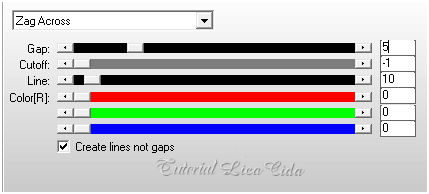
Plugin Alien Skin Eye Candy 5: Impact → Perspective Shadow — Lowest.
11_.
Repita a Custom Selection 2 (print do item 8).
Layers → New Raster Layer.
Pinte com a cor do Foreground: #e8f1f6 (clara).
Selections → Select None.
Layers → New Mask Layer → From Image: Narah_mask_0544.
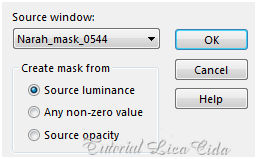
Layers → Merge → Merge Group.
12_.
Plugin AP [Lines] → Lines - SilverLining → Dotty Grid.
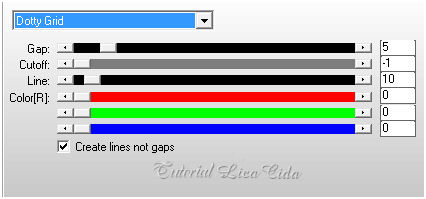
Effects → Edge Effects → Enhance.
Opacity: 81%.
Plugin Alien Skin Eye Candy 5: Impact → Perspective Shadow — Blurry.
LAYERS
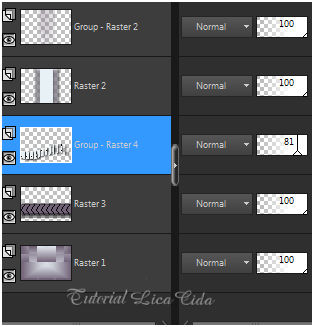
13_.
Edit → Copy no Ildiko_create_deco (152)
Edit → Paste As New Layer.
Layers → Arrange → Bring to Top.
Objects → Align → Top.
14_.
Edit → Copy no Paysage misted jewel 030
Edit → Paste As New Layer.
Image → Resize: 80% — Resize all layers desmarcado.
Adjust → Sharpness → Sharpen More.
O uso do misted na tag é opcional.
15_.
Edit → Copy no Ildiko_create_deco (15)
Edit → Paste As New Layer.
Com a ferramenta Pick Tool, acerte no back.
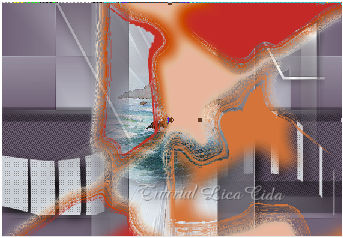
Blend Mode: Multiply.
Colorize a gosto (de acordo com as cores usadas).
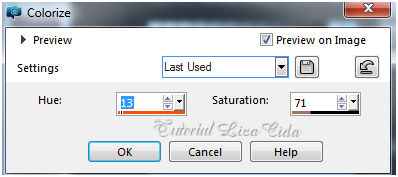
Adjust → Sharpness → Sharpen More.
16_.
Repita: Edit → Copy no Ildiko_create_deco (152)
Edit → Paste As New Layer.
Objects → Align → Top.
Objects → Align → Right.
17_.
Edit → Copy no decolc
Edit → Paste As New Layer.
18_.
Edit → Copy no text
Edit → Paste As New Layer.
Posicione.
Adjust → Sharpness → Sharpen More.
19_.
Ative a Raster 3.
Edit → Copy no pixelcorners03-st-mel
Edit → Paste As New Layer.
Use a gosto.
20_.
Image → Add Borders: 1 px, Symmetric marcado — Color: #716277 (Background, escura).
Image → Add Borders: 40 px, Symmetric marcado — Color: #e8f1f6 (Foreground, clara).
Selecione essa borda e pinte com o gradiente, mudando para: Style: Linear — Angle: 0 — Repeats: 1 — Invert marcado.
Use as cores acima.
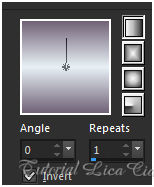
21_.
Repita: Plugin AP [Lines] → Lines - SilverLining → ZagAcross (print do item 10).
Selections → Invert.
Effects → 3D Effects → Drop Shadow: 0 / 0 / 80 / 40,00 — Color: #000000.
Selections → Select None.
22_.
Edit → Copy no Beauty_in_lilac_by_CibiBijoux
Edit → Paste As New Layer.
Posicione.
Adjust → Sharpness → Sharpen.
Image → Add Borders: 1 px, Symmetric marcado — Color: #716277 (Background, escura).
Opcional: Plugin AAA Filters → Custom — Landscape.
Aplique a marca-d'água.
Assine e salve.
Espero que gostem.
Aparecida / LicaCida, abril de 2017.
Rio de Janeiro - Brasil.

VOLTAR
Copyright ©2026 - Web Design - Naise Minas
|

