|
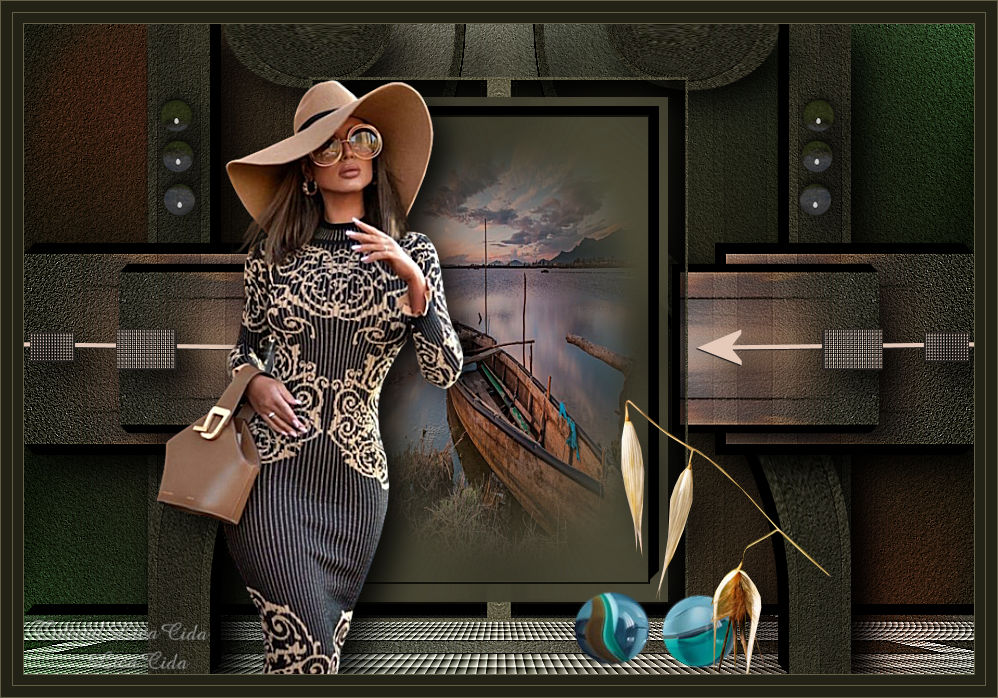
Direction
TRADUÇÕES

MATERIAL

Seleções: directionlc1
directionlc2
directionlc3
directionlc4 --
Salvar na pasta Selections do PSP.
Preset: Illumination → Lights → Preset_Lights_lc11 --
Salvar na pasta Presets do PSP.
Masks: NarahsMasks_1579
20-20
Deco: decor_nmcriacoes_74
calguisveg1159
calguisbilles21102011
decolc1
Tubes: Jeanne_Woman_Lara_12_08_2020
Jeanne Backgr 467
Marca-d'água.
Efeitos do PSP.
Versão usada: PSP X9.
PLUGINS
Plugin Simple → Top Left Mirror
Plugin Galaxy → Instant Mirror
Plugin FM Tile Tools → Blend Emboss
Plugin Alien Skin Eye Candy 5: Impact → Extrude
Plugin Alien Skin Eye Candy 5: Impact → Perspective Shadow
Plugin AAA Filters → Tweed Frame
Plugin MuRa's Meister → Perspective Tiling
TUTORIAL
|
Esta seta marca sua linha
Clique e arraste para movê-la
|
|
Configure: Foreground: #222216 — Background: #625f46.
1_.
Abra uma nova imagem transparente de 950 x 650 px.
Pinte com a cor do Background.
2_.
Layers → New Raster Layer.
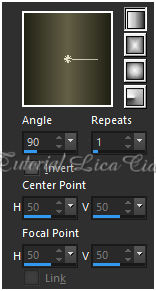
Pinte com o gradiente formado pelas cores acima.
Configure: Style: Linear — Angle: 90 — Repeats: 1 — Invert desmarcado.
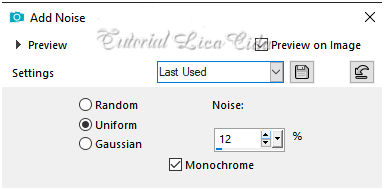
Adjust → Add/Remove Noise → Add Noise.
Adjust → Add/Remove Noise → JPEG Artifact Removal — Maximum — C: 78.
Plugin FM Tile Tools → Blend Emboss — Default.
3_.
Layers → New Mask Layer → From Image: NarahsMasks_1579.
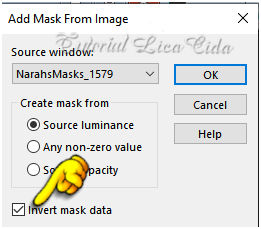
Effects → Edge Effects → Enhance More.
Layers → Merge → Merge Group.
Plugin Alien Skin Eye Candy 5: Impact → Perspective Shadow — Blurry.
4_.
Plugin Simple → Top Left Mirror.
5_.
Selections → Load/Save Selection → Load Selection From Disk → directionlc1.
Selections → Promote Selection to Layer.
6_.
Selections → Modify → Contract: 20 px.
7_.
Plugin Galaxy → Instant Mirror.
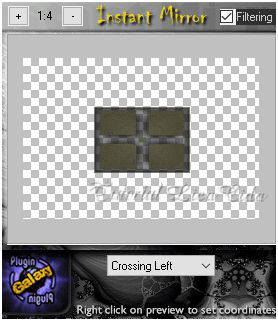
Adjust → Blur → Gaussian Blur — Radius: 48,00.
8_.
Selections → Modify → Contract: 20 px.
9_.
Plugin Alien Skin Eye Candy 5: Impact → Extrude — Color: #000000.
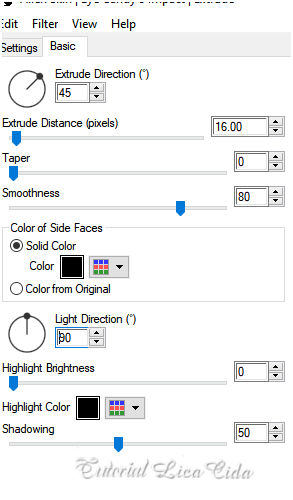
10_.
Separe o misted e use a mask 20-20, que segue no material (opcional).
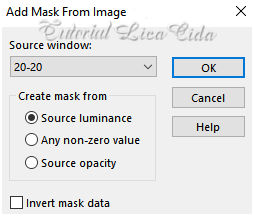
Layers → Merge → Merge Group.
11_.
Edit → Copy no misted Jeanne Backgr 467 (com a mask aplicada)
Edit → Paste Into Selection.
Adjust → Sharpness → Sharpen More.
Deixe o misted aberto no PSP e minimize.
12_.
Effects → 3D Effects → Chisel — Color: Foreground.
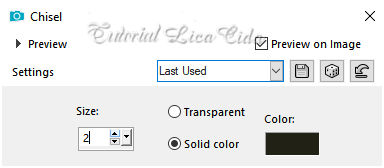
Selections → Select None.
13_.
Ative a Group-Raster 2.
Selections → Load/Save Selection → Load Selection From Disk → directionlc2.
Selections → Promote Selection to Layer.
ATENÇÃO
14_.
O misted deverá estar na memória. Caso não esteja, maximize o misted minimizado e use Edit → Copy.
Edit → Paste Into Selection.
Adjust → Sharpness → Sharpen More.
15_.
Repita o item 9: Plugin Alien Skin Eye Candy 5: Impact → Extrude.
Selections → Select None.
16_.
Plugin Simple → Top Left Mirror.
Layers → Duplicate.
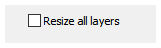
Image → Resize: 80% — Resize all layers desmarcado.
Plugin Alien Skin Eye Candy 5: Impact → Perspective Shadow — Blurry (aplique nas duas layers).
Layers → Merge → Merge Down.
17_.
Ative a Group-Raster 2.
Selections → Load/Save Selection → Load Selection From Disk → directionlc3.
Selections → Promote Selection to Layer.
18_.
Repita o item 9: Plugin Alien Skin Eye Candy 5: Impact → Extrude.
Selections → Select None.
Effects → Reflection Effects → Rotating Mirror: 0 / 180 — Reflect.
Layers → Duplicate.
19_.
Effects → Distortion Effects → Warp.
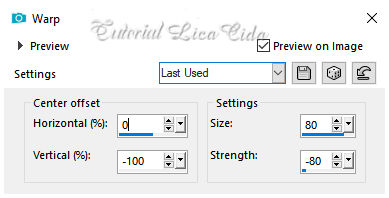
Plugin Alien Skin Eye Candy 5: Impact → Perspective Shadow — Blurry (nas duas layers).
20_.
Ative a Group-Raster 2.
Selections → Load/Save Selection → Load Selection From Disk → directionlc4.
Selections → Promote Selection to Layer.
21_.
Plugin AAA Filters → Tweed Frame.
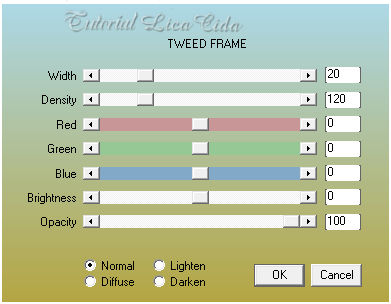
22_.
Repita o item 9: Plugin Alien Skin Eye Candy 5: Impact → Extrude.
23_.
Plugin MuRa's Meister → Perspective Tiling.
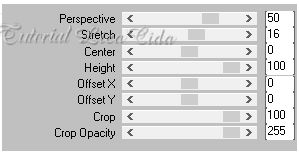
Adjust → Sharpness → Sharpen More.
Selections → Select None.
24_.
Ative a Group-Raster 2.
Effects → Illumination Effects → Lights → Preset_Lights_lc11.
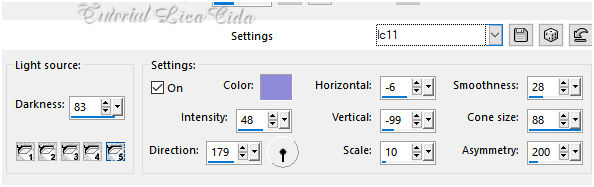
Layers → Duplicate.
Image → Mirror → Mirror Vertical.
Image → Mirror → Mirror Horizontal.
Opacity: 51%.
Altere os Blend Modes e a Opacity das layers.
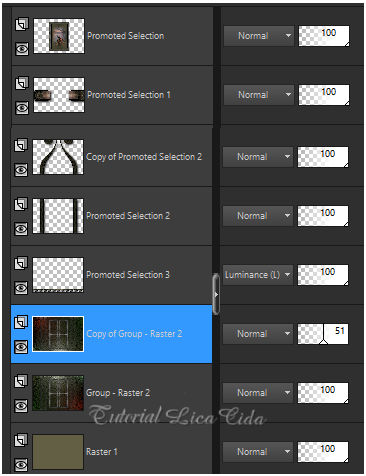
25_.
Edit → Copy no decor_nmcriacoes_74
Edit → Paste As New Layer.
Layers → Arrange → Bring to Top (Raster 2).
26_.
Image → Free Rotate.
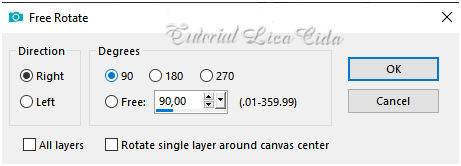
27_.
Effects → Image Effects → Offset.
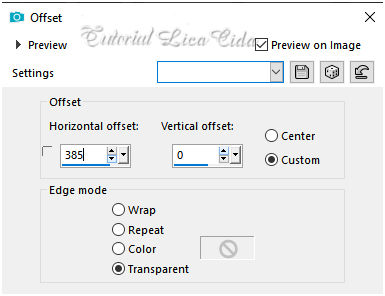
Effects → Reflection Effects → Rotating Mirror: 0 / 0 — Reflect.
Plugin Alien Skin Eye Candy 5: Impact → Perspective Shadow — Blurry.
28_.
Edit → Copy no decolc1
Edit → Paste As New Layer.
29_.
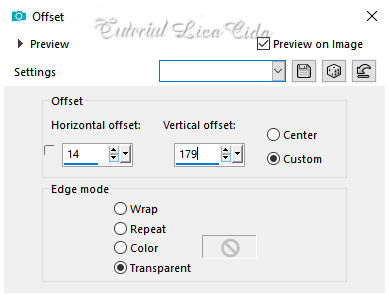
Effects → Image Effects → Offset.
30_.
Edit → Copy no tube Jeanne_Woman_Lara_12_08_2020
Edit → Paste As New Layer.
Posicione.
31_.
Edit → Copy nos decos calguisbilles21102011 e calguisveg1159
Edit → Paste As New Layer.
Use a gosto.
Image → Add Borders: 1 px — Color: Background.
Image → Add Borders: 10 px — Color: Foreground.
Image → Add Borders: 1 px — Color: Background.
Image → Add Borders: 10 px — Color: Foreground.
Image → Add Borders: 1 px — Color: Background.
Aplique a marca-d'água.
Assine e salve.
Espero que gostem.
Obrigada!
Aparecida / LicaCida, setembro de 2020.
Rio de Janeiro - Brasil.

VOLTAR
Copyright ©2026 - Web Design - Naise Minas
|


