|
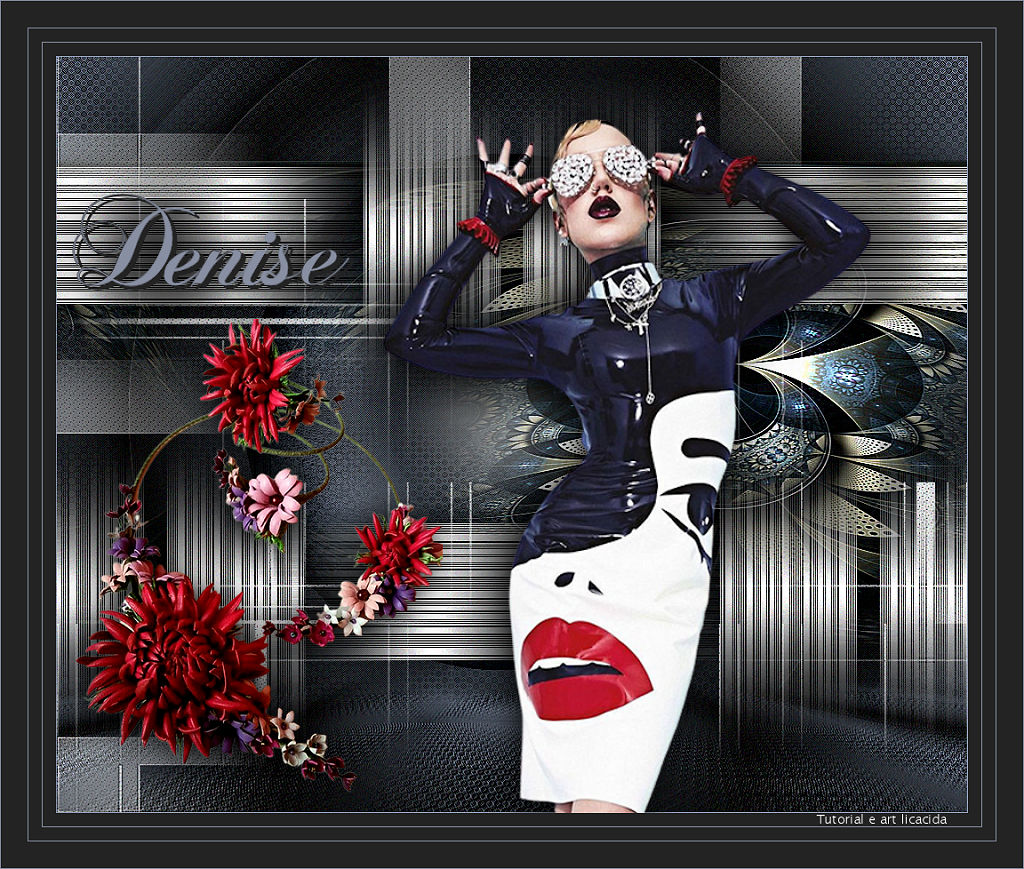
Denise
TRADUÇÕES

MATERIAL

Seleção: guardada no canal alfa da imagem AlphaChannelDenise (Selection #1).
Tubes: 607MulherByPqnaAlice
Callitubes-238flores
Fractal: Callitubes-23fractal
Decor: decor_nmcriacoes_126
Título: Titulobylicacida
Marca-d'água.
Efeitos do PSP.
PLUGINS
Plugin Filters Unlimited 2 → &<Bkg Designer sf10 I> → Circus Maximus
Plugin L en K's → Palmyre
Plugin VM Instant Art → Steel Mesh
Plugin Transparency → Eliminate Black
Plugin FFG → B_Cristal Ball
Plugin Flaming Pear → Flexify 2
Plugin MuRa's Meister → Perspective Tiling
Plugin AAA Filters → Custom
TUTORIAL

|
Esta seta marca sua linha
Clique e arraste para movê-la
|
|
Abra o material no PSP, duplique e feche os originais.
Escolha duas cores para trabalhar: Foreground: #232323 — Background: #888fa2.
1_.
Abra a cópia do AlphaChannelDenise.
Pinte a transparência com o gradiente formado pelas cores configuradas acima.
Configure: Style: Sunburst — Repeats: 2 — Invert desmarcado — Center Point: H: 50 / V: 50 — Focal Point: H: 50 / V: 50.
2_.
Plugin Filters Unlimited 2 → &<Bkg Designer sf10 I> → Circus Maximus — Circles: 170.
3_.
Plugin L en K's → Palmyre: Default (255 / 7).
4_.
Layers → New Raster Layer.
Pinte a transparência com o mesmo gradiente.
5_.
Plugin VM Instant Art → Steel Mesh: 100 / 100 / 0 / 0 / 0 / 255 / 99.
6_.
Plugin Transparency → Eliminate Black.
Layers → Duplicate.
Image → Mirror → Mirror Horizontal.
Layers → Merge → Merge Down.
Aplique um Drop Shadow a gosto.
7_.
Ative a Raster 1.
Selections → Load/Save Selection → Load Selection From Alpha Channel → Selection #1.
Selections → Promote Selection to Layer.
8_.
Plugin FFG → B_Cristal Ball.
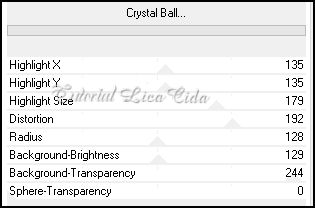
Aplique um Drop Shadow a gosto.
Selections → Select None.
9_.
Edit → Copy no fractal Callitubes-23fractal
Edit → Paste As New Layer.
10_.
Plugin Flaming Pear → Flexify 2.
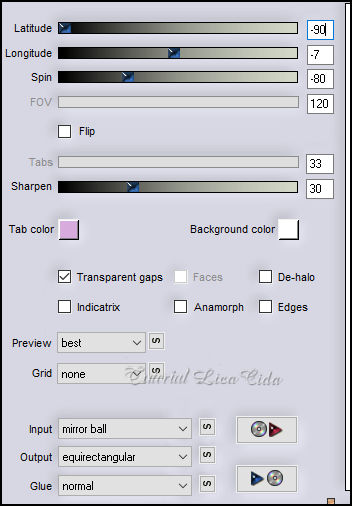
Image → Mirror → Mirror Horizontal.
Adjust → Sharpness → Sharpen More.
11_.
Tecle K para ativar a ferramenta Pick Tool — Position X: -92 / Position Y: 116.
Tecle M para desativar a ferramenta.
12_.
Ative novamente a Raster 1.
Image → Canvas Size: 1024 x 850 — Bottom: 50.
Layers → Duplicate.
13_.
Plugin MuRa's Meister → Perspective Tiling.
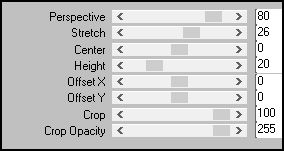
Layers → Arrange → Move Up.
Effects → Reflection Effects → Rotating Mirror: 0 / 180 — Reflect.
14_.
Com a ferramenta Magic Wand — Tolerance: 0 / Feather: 60, clique na parte transparente de cima deste efeito para selecioná-la.
Pressione a tecla Delete do teclado de 7 a 8 vezes.
Selections → Select None.
Effects → User Defined Filter → Emboss_3.
15_.
Ative a layer do topo (Raster 2).
Layers → New Raster Layer.
Selections → Select All.
Edit → Copy no decor_nmcriacoes_126
Edit → Paste Into Selection.
Selections → Select None.
16_.
Effects → Texture Effects → Weave — Color: Foreground.
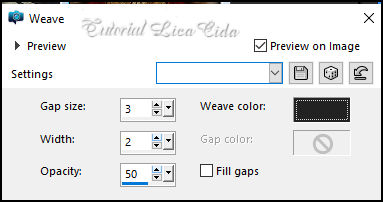
Adjust → Sharpness → Sharpen.
Apague as partes indicadas no print:

Altere os Blend Modes e a Opacity das layers.
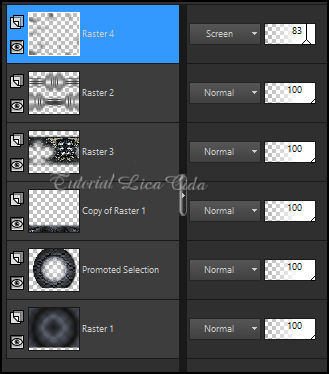
Image → Add Borders: 1 px, Symmetric marcado — Color: Background (clara).
17_.
Plugin AAA Filters → Custom → Sharp.
Repita o plugin com a opção Grain.
18_.
Edit → Copy no tube 607MulherByPqnaAlice
Edit → Paste As New Layer.
Image → Resize: 120% — Resize all layers desmarcado.
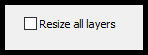
Posicione e aplique um Drop Shadow a gosto.
19_.
Edit → Copy no tube Callitubes-238flores
Edit → Paste As New Layer.
Image → Resize: 80% — Resize all layers desmarcado.
Posicione e aplique um Drop Shadow a gosto.
20_.
Edit → Copy no Titulobylicacida
Edit → Paste As New Layer.
Posicione.
BORDAS
Image → Add Borders: 15 px, Symmetric marcado — Color: Foreground (escura).
Image → Add Borders: 1 px, Symmetric marcado — Color: Background (clara).
Image → Add Borders: 15 px, Symmetric marcado — Color: Foreground (escura).
Image → Add Borders: 1 px, Symmetric marcado — Color: Background (clara).
Image → Add Borders: 30 px, Symmetric marcado — Color: Foreground (escura).
Image → Add Borders: 1 px, Symmetric marcado — Color: Background (clara).
Aplique a marca-d'água.
Assine e salve.
Image → Resize — Width: 1024 px.
Espero que apreciem.
Obrigada!
Aparecida / LicaCida, outubro de 2022.
Rio de Janeiro - Brasil.

VOLTAR
Copyright ©2026 - Web Design - Naise Minas
|


