|
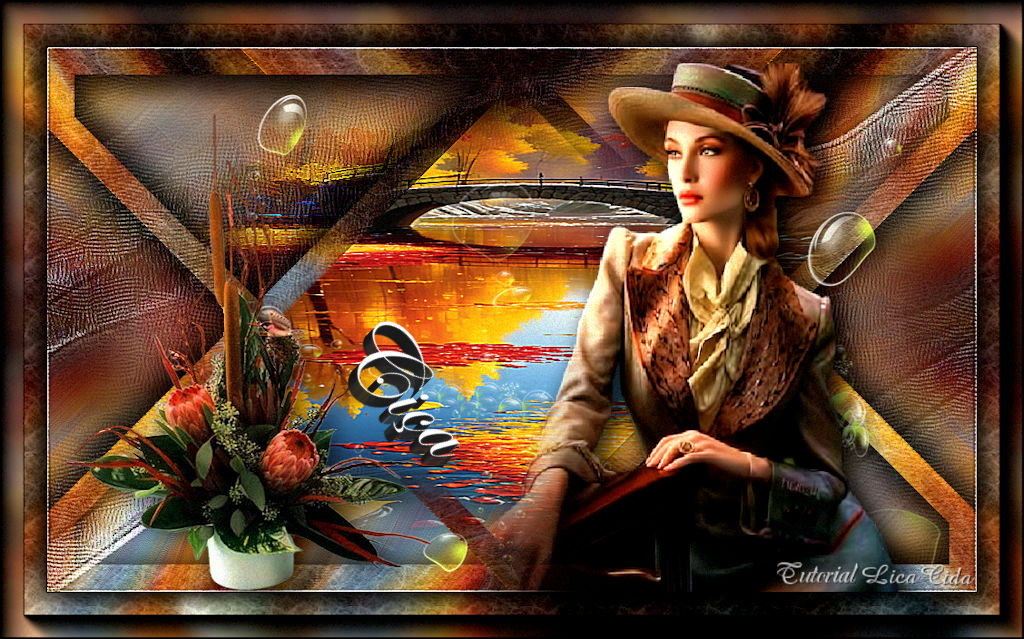
Ciça
DEDICATÓRIA
Carinhosamente.
TRADUÇÕES

MATERIAL

Back: mentali-misted3290-back
Tubes: Callitubes-5007mulheres
mentali-misted3290
TUBE_NAISEM_FLORES_115
(Agradeço)
Decor: elementoarquivo
decor-lc
Título: titulo (escolha a gosto)
Marca-d'água.
Efeitos do PSP.
PLUGINS
Plugin Toadies
Plugin Simple → Quick Tile
Plugin Simple → Half Wrap
Plugin Simple → 4Way Average
Plugin L en K's
Plugin It@lian Editors Effect
Plugin VanDerLee
Plugin MuRa's Meister → Pole Transform
Plugin Filters Unlimited 2.0 → Paper Textures → Fibrous Paper, Coarse
Plugin Artistic → Rough Pastels
Plugin Virtual Painter → Virtual Painter 4
Plugin AAA Frames → Foto Frame
TUTORIAL

|
Esta seta marca sua linha
Clique e arraste para movê-la
|
|
1_.
Abra o material no PSP, duplique e feche o original.
Não vamos trabalhar com cores específicas.
2_.
Abra uma nova imagem transparente de 1024 x 600 px.
3_.
Selections → Select All.
Edit → Copy no mentali-misted3290-back
Edit → Paste Into Selection.
Selections → Select None.
Você poderá fazer seu próprio back, de acordo com seu misted.
4_.
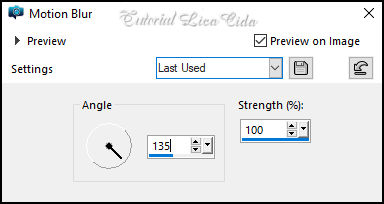
Adjust → Blur → Motion Blur — aplique três vezes.
5_.
Effects → Reflection Effects → Rotating Mirror — Default.
6_.
Effects → Edge Effects → Enhance More.
7_.
Plugin Simple → Quick Tile.
8_.
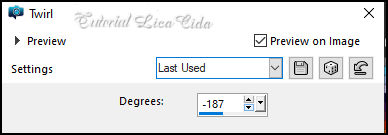
Effects → Distortion Effects → Twirl: -187.
9_.
Plugin Simple → Half Wrap.
10_.
Effects → Edge Effects → Enhance.
Layers → Duplicate.
11_.
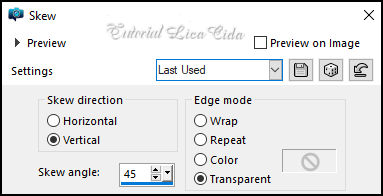
Effects → Geometric Effects → Skew.
12_.
Selections → Select All.
Selections → Float.
13_.
Selections → Modify → Contract: 30 px.
Selections → Invert.
14_.
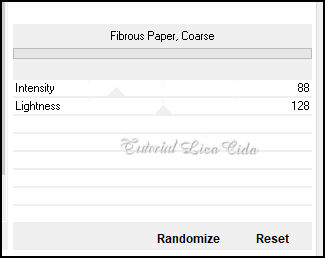
Plugin Filters Unlimited 2.0 → Paper Textures → Fibrous Paper, Coarse.
15_.
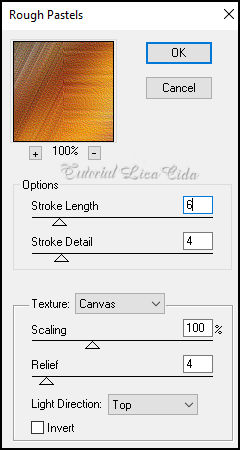
Plugin Artistic → Rough Pastels.
Effects → 3D Effects → Drop Shadow: 0 / 0 / 80 / 40,00 — Color: #000000.
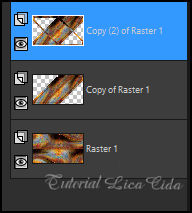
Layers → Duplicate.
Image → Mirror → Mirror Horizontal.
Selections → Select None.
Effects → 3D Effects → Drop Shadow: 0 / 0 / 80 / 40,00 — Color: #000000.
16_.
Ative a layer do topo.
Selections → Select All.
Selections → Float.
Selections → Defloat.
17_.
Selections → Modify → Contract: 30 px.
Layers → New Raster Layer.
18_.
Edit → Copy no mentali-misted3290
Edit → Paste Into Selection.
Selections → Select None.
Adjust → Sharpness → Sharpen More.
Reforce na layer inferior:
Effects → 3D Effects → Drop Shadow: 0 / 0 / 80 / 40,00 — Color: #000000.
19_.
Ative a Raster 1.
Plugin Simple → 4Way Average.
20_.
Plugin Simple → Quick Tile.
Layers → New Raster Layer.
21_.
Selections → Select All.
Edit → Copy no mentali-misted3290
Edit → Paste Into Selection.
Selections → Select None.
22_.
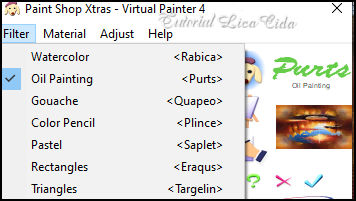
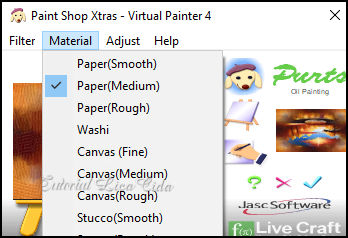
Plugin Virtual Painter → Virtual Painter 4 — Filter: Oil Painting — Material: Paper (Medium).
Effects → Edge Effects → Enhance More.
23_.
Edit → Copy no elementoarquivo
Edit → Paste As New Layer.
Layers → Arrange → Bring to Top (use a gosto).
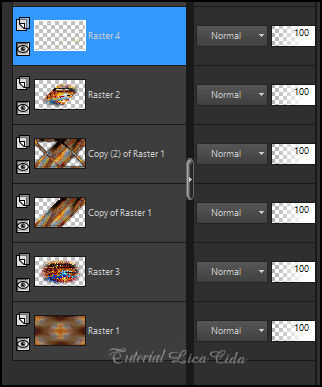
LAYERS
24_.
Edit → Copy no decor-lc
Edit → Paste As New Layer.
Use abaixo da Raster 2.
Blend Mode: Hard Light — Opacity: 85%.
25_.
Ative a layer do topo.
Edit → Copy no tube Callitubes-5007mulheres
Edit → Paste As New Layer.
Posicione e use a gosto.
26_.
Edit → Copy no tube TUBE_NAISEM_FLORES_115
Edit → Paste As New Layer.
Posicione e use a gosto.
Edit → Copy no título (use a gosto)
Edit → Paste As New Layer.
27_.
Edit → Copy Special → Copy Merged.
Image → Add Borders: 1 px, Symmetric marcado — Color: #000000.
Selections → Select All.
Image → Add Borders: 50 px, Symmetric marcado — Color: #ffffff.
Selections → Invert.
Edit → Paste Into Selection.
Adjust → Blur → Gaussian Blur — Radius: 10.
Plugin Filters Unlimited 2.0 → Paper Textures → Fibrous Paper, Coarse (print do item 14).
Plugin AAA Frames → Foto Frame — Width: 25, demais valores Default.
Edit → Repeat.
Selections → Invert.
Effects → 3D Effects → Drop Shadow: 0 / 0 / 80 / 40,00 — Color: #000000.
Edit → Repeat.
Selections → Select None.
Image → Add Borders: 1 px, Symmetric marcado — Color: #000000.
Image → Resize: Width 1024 px.
Aplique a marca-d'água.
Assine e salve.
File → Export → JPEG Optimizer.
Espero que gostem.
Aparecida / LicaCida, setembro de 2024.
Rio de Janeiro - Brasil.

VOLTAR
Copyright ©2026 - Web Design - Naise Minas
|


