|
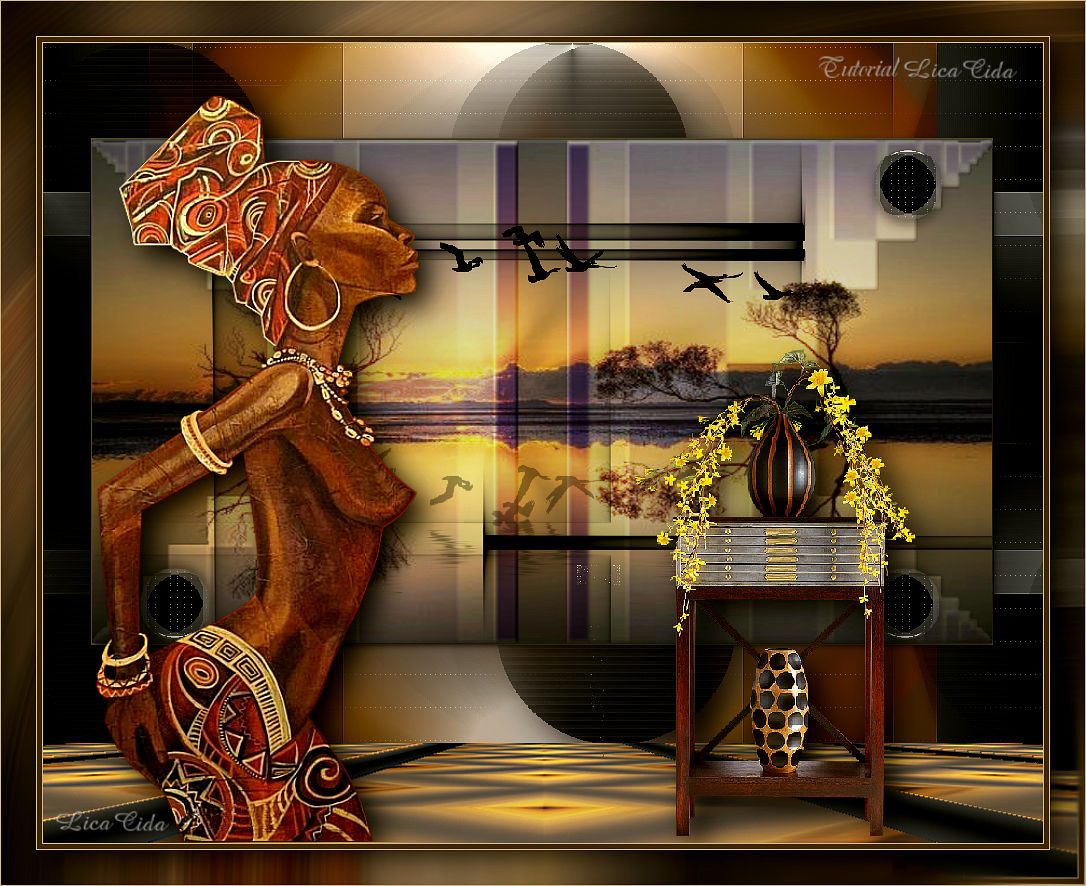
Atardecer en África
TRADUÇÕES

MATERIAL

Preset: Illumination → Lights → Preset_Lights_palco --
Salvar na pasta Presets do PSP.
Imagem JPG: fondo-de-pantalla-atardecer-en-africa_2129290388
Tubes: Yoka-ProudLady-080117
Vase-220-Azalee
Deco: ildiko@create0018_deco
Ildiko_Desings_Created@Deco_&_ildiko_kjk 1-10 (7)
decolc
Brush: Geese_Brushes_by_sd_stock_9
Marca-d'água.
Efeitos do PSP.
Versão usada: PSP X8.
PLUGINS
Plugin FFG → B
Plugin Simple → Top Left Mirror
Plugin Mehdi → Sorting Tiles
Plugin Graphics Plus → Vertical Mirror
Plugin L en K's → Zitah
Plugin VanDerLee → UnPlugged-X → Pieslice
Plugin Carolaine and Sensibility → CS-HLines
Plugin Alien Skin Eye Candy 5: Impact → Perspective Shadow
Plugin MuRa's Meister → Perspective Tiling
Plugin Graphics Plus → Cross Shadow
Plugin AAA Filters → Custom
TUTORIAL
|
Esta seta marca sua linha
Clique e arraste para movê-la
|
|
1_.
Abra uma nova imagem transparente de 1000 x 700 px.
Selections → Select All.
Edit → Copy na imagem fondo-de-pantalla-atardecer-en-africa_2129290388
Edit → Paste Into Selection.
Selections → Select None.
2_.
Adjust → Blur → Radial Blur.
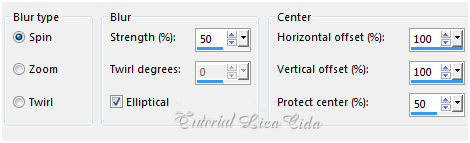
Layers → Duplicate.
Image → Mirror → Mirror Horizontal.
Opacity: 50% — Blend Mode: Overlay.
Layers → Merge → Merge Down.
3_.
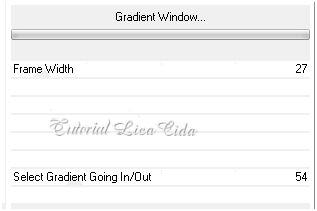
Plugin FFG → B.
4_.
Plugin Simple → Top Left Mirror.
5_.
Effects → Geometric Effects → Skew.
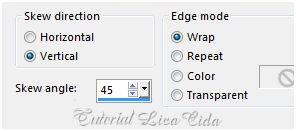
Repita: Plugin Simple → Top Left Mirror.
Layers → Duplicate.
6_.
Plugin Mehdi → Sorting Tiles.
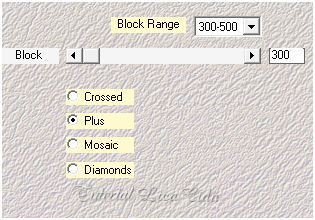
7_.
Plugin Graphics Plus → Vertical Mirror — Default (128 / 0).
Repita: Plugin Simple → Top Left Mirror.
Effects → Edge Effects → Enhance.
8_.
Plugin L en K's → Zitah — Default.
9_.
Layers → New Raster Layer.
Plugin VanDerLee → UnPlugged-X → Pieslice — Color: #000000.
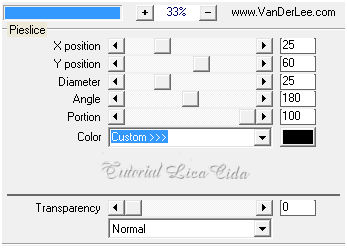
10_.
Plugin Carolaine and Sensibility → CS-HLines — Default (3 / 0 / 10).
Effects → Edge Effects → Enhance.
11_.
Effects → Image Effects → Seamless Tiling: Side by side.
Layers → Duplicate.
Image → Resize: 80% — Resize all layers desmarcado.
12_.
Effects → Image Effects → Seamless Tiling.
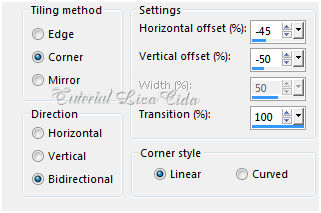
Layers → Duplicate.
Image → Mirror → Mirror Vertical.
Layers → Merge → Merge Down (aplique duas vezes).
Plugin Alien Skin Eye Candy 5: Impact → Perspective Shadow — Blurry.
13_.
Ative a ferramenta Selection Tool (tecla S) → Custom Selection.
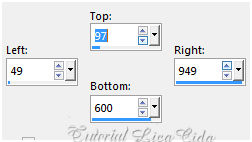
Layers → New Raster Layer.
Edit → Copy na imagem fondo-de-pantalla-atardecer-en-africa_2129290388
Edit → Paste Into Selection.
14_.
Layers → New Raster Layer.
Edit → Copy no ildiko@create0018_deco
Edit → Paste Into Selection.
Blend Mode: Overlay.
15_.
Edit → Copy no Ildiko_Desings_Created@Deco_&_ildiko_kjk 1-10 (7) (Copy of Raster 1)
Edit → Paste As New Layer.
Image → Negative Image.
16_.
Effects → 3D Effects → Chisel — Size: 2 — Solid Color — Color: #c2ae8a (retirada do tube principal).
Selections → Select None.
Plugin Alien Skin Eye Candy 5: Impact → Perspective Shadow — Blurry.
17_.
Ative a Raster 2.
Repita: Effects → Image Effects → Seamless Tiling: Side by side.
18_.
Ative a Copy of Raster 1.
Effects → Illumination Effects → Lights → Preset_Lights_palco.
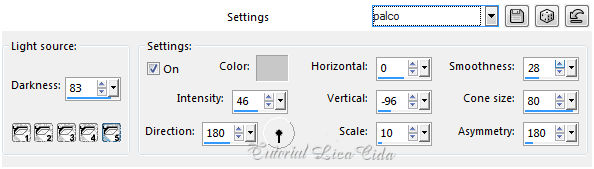
Blend Mode: Luminance (L).
19_.
Ative a Raster 1.
Image → Canvas Size: 1000 x 800 — Bottom: 100.
Edit → Copy.
Com a ferramenta Magic Wand (Default), selecione a parte transparente.
20_.
Layers → New Raster Layer.
Edit → Paste Into Selection.
Plugin MuRa's Meister → Perspective Tiling — Default.
Effects → User Defined Filter → Emboss_3.
Plugin Alien Skin Eye Candy 5: Impact → Perspective Shadow — Blurry.
Selections → Select None.
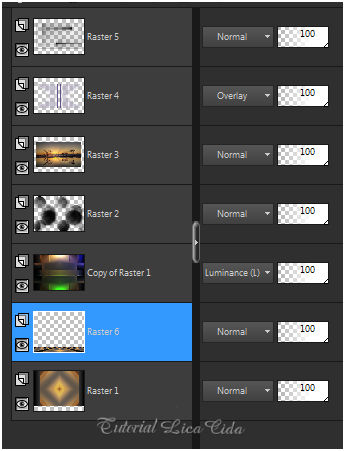
LAYERS
Altere os Blend Modes e a Opacity das layers.
21_.
Ative a Raster 5.
Edit → Copy no Geese_Brushes_by_sd_stock_9
Edit → Paste As New Layer.
Image → Resize: 80% — Resize all layers desmarcado.
Use a gosto.
22_.
Edit → Copy no decolc
Edit → Paste As New Layer.
Layers → Duplicate.
Posicione como no modelo.
23_.
Edit → Copy no tube Yoka-ProudLady-080117
Edit → Paste As New Layer.
Posicione a gosto.
Adjust → Sharpness → Sharpen More.
Plugin Alien Skin Eye Candy 5: Impact → Perspective Shadow — Blurry.
24_.
Edit → Copy no tube Vase-220-Azalee
Edit → Paste As New Layer.
Image → Resize: 80% — Resize all layers desmarcado (aplique três vezes).
Posicione a gosto.
Adjust → Sharpness → Sharpen.
Plugin Alien Skin Eye Candy 5: Impact → Perspective Shadow — Blurry.
Image → Add Borders: 1 px, Symmetric marcado — Color: #c2ae8a (cor usada no Chisel).
Image → Add Borders: 5 px, Symmetric marcado — Color: #463116 (mais escura, retirada do tube principal).
Image → Add Borders: 1 px, Symmetric marcado — Color: #c2ae8a (cor usada no Chisel).
Edit → Copy.
Image → Add Borders: 35 px, Symmetric marcado — Color: #ffffff.
Selecione a borda.
Edit → Paste Into Selection.
25_.
Repita o item 2: Adjust → Blur → Radial Blur (mesmos valores).
26_.
Plugin Graphics Plus → Cross Shadow — Default.
Selections → Invert.
Effects → 3D Effects → Drop Shadow: 0 / 0 / 60 / 30,00 — Color: #000000.
Selections → Select None.
Image → Add Borders: 1 px, Symmetric marcado — Color: #c2ae8a (cor usada no Chisel).
Plugin AAA Filters → Custom → Landscape.
Aplique a marca-d'água.
Assine e salve.
Espero que gostem.
Aparecida / LicaCida, fevereiro de 2017.
Rio de Janeiro - Brasil.

VOLTAR
Copyright ©2026 - Web Design - Naise Minas
|

