|
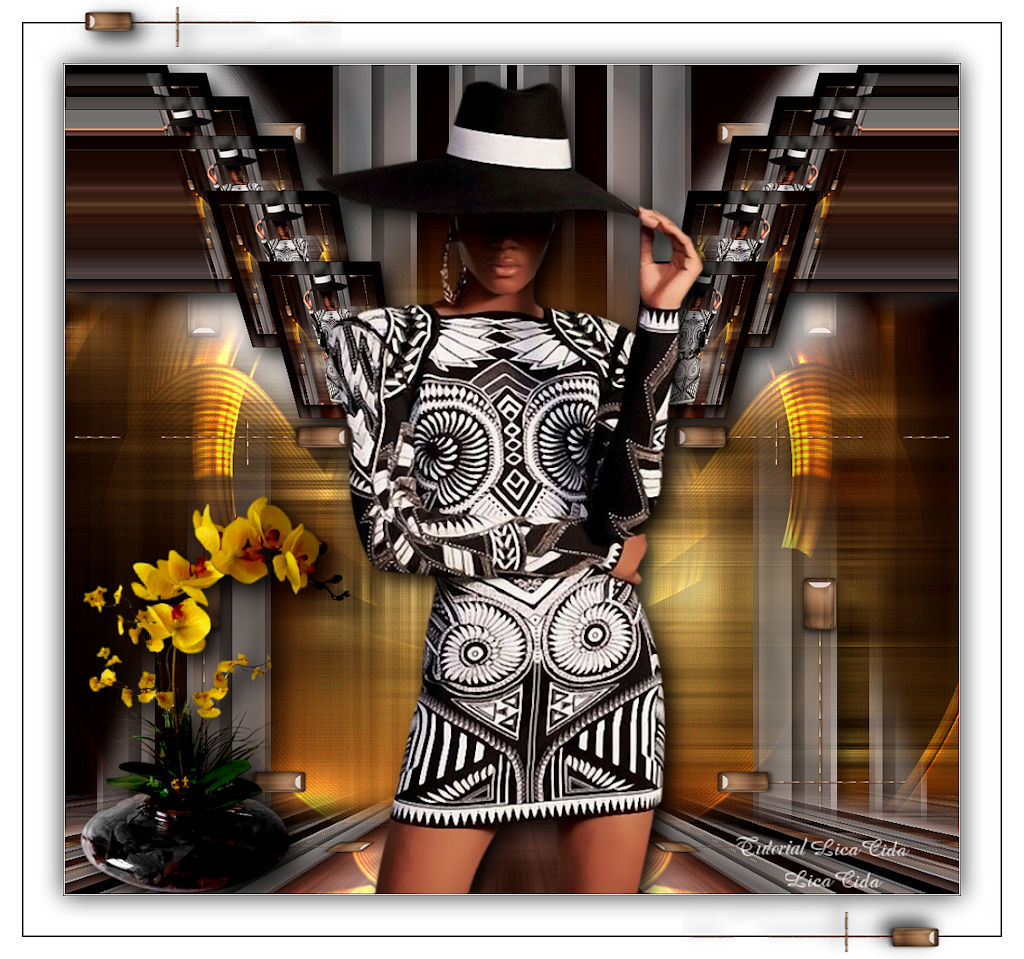
Annie Jewel
DEDICATÓRIA
Carinhosamente.
TRADUÇÕES

MATERIAL

Seleção: annie_lc --
Salvar na pasta Selections do PSP.
Tubes: Femme chapeau jewel 012
SuizaBella_Ref_AG-001939-10
Decos: decodouradoannie-lc
deco-mp
elemento-mp
acabamentoborda.mp
Marca-d'água.
Efeitos do PSP.
Versão usada: PSP X9.
PLUGINS
Plugin Filter Factory Gallery A → Marble Madness One
Plugin Filter Factory Gallery B → Vibes
Plugin Tramages → Panel Stripes
Plugin Alien Skin Eye Candy 5: Impact → Perspective Shadow
Plugin Mehdi → Weaver
Plugin AAA Frames → Foto Frame
Plugin MuRa's Meister → Copies
Plugin MuRa's Meister → Perspective Tiling
Plugin MuRa's Seamless → Emboss at Alpha
Plugin VM Stylize → Zoom Blur
Plugin Nik Software → Color Efex Pro 3.0 → Bi-Color Filters
TUTORIAL
|
Esta seta marca sua linha
Clique e arraste para movê-la
|
|
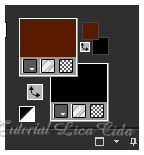
Configure: Foreground: #5a1c00 — Background: #000000.
1_.
Abra uma nova imagem transparente de 1024 x 900 px.
2_.
Selections → Load/Save Selection → Load Selection From Disk → annie_lc.
Ferramenta Flood Fill — Opacity: 60%: pinte com a cor do Foreground (#5a1c00).
Selections → Select None.
3_.
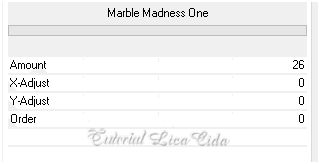
Plugin Filter Factory Gallery A → Marble Madness One — Default.
4_.
Plugin Filter Factory Gallery B → Vibes.
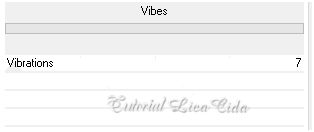
5_.
Plugin Tramages → Panel Stripes.
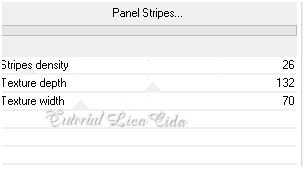
6_.
Layers → New Raster Layer.
Layers → Arrange → Send to Bottom.
Pinte com o gradiente formado pelas cores configuradas acima, como no print abaixo — Opacity: 100%.
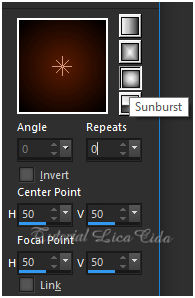
7_.
Ative a Raster 1.
Effects → Image Effects → Seamless Tiling:
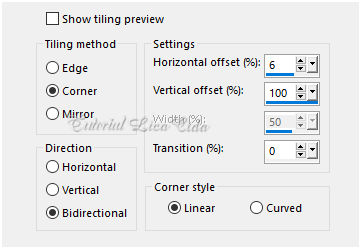
Layers → Duplicate.
Image → Mirror → Mirror Horizontal.
Layers → Merge → Merge Down.
Plugin Alien Skin Eye Candy 5: Impact → Perspective Shadow — Blurry.
8_.
Ative a Raster 2.
Selections → Select All.
Edit → Copy no Femme chapeau jewel 012
Edit → Paste Into Selection.
Selections → Select None.
9_.
Adjust → Blur → Radial Blur.
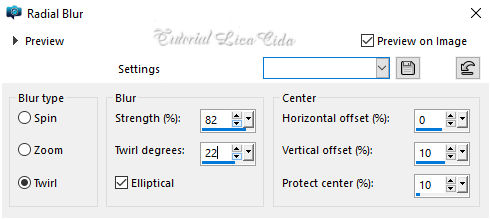
10_.
Plugin Mehdi → Weaver.
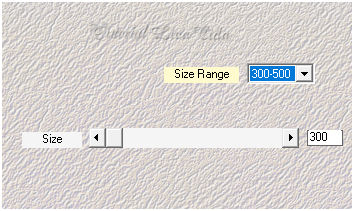
Adjust → Sharpness → Sharpen More.
Effects → Edge Effects → Enhance.
11_.
Edit → Copy no decodouradoannie-lc
Edit → Paste As New Layer.
Blend Mode: Dodge.
Adjust → Sharpness → Sharpen More.
Plugin Alien Skin Eye Candy 5: Impact → Perspective Shadow — Blurry.
12_.
Edit → Copy no deco-mp
Edit → Paste As New Layer.
Layers → Arrange → Bring to Top.
13_.
Edit → Copy no Femme chapeau jewel 012
Edit → Paste As New Layer.
Posicione a gosto.
14_.
Ative a Raster 2.
Layers → Duplicate.
Blend Mode: Overlay.
Altere os Blend Modes e a Opacity das layers.
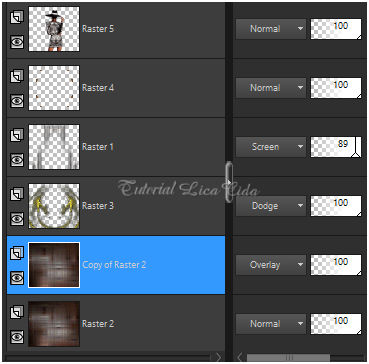
15_.
Ative a layer superior (Raster 5).
Edit → Copy Special → Copy Merged.
Edit → Paste As New Image.
16_.
Na nova imagem formada:
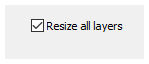
Image → Resize: 20% — Resize all layers marcado.
Plugin AAA Frames → Foto Frame — Width: 15 (demais valores Default).
17_.
Edit → Copy na imagem formada e trabalhada
Edit → Paste As New Layer no seu trabalho (Raster 6).
18_.
Effects → Image Effects → Offset: H: 324 / V: 262 — Custom e Transparent marcados.
19_.
Plugin MuRa's Meister → Copies — Throw.
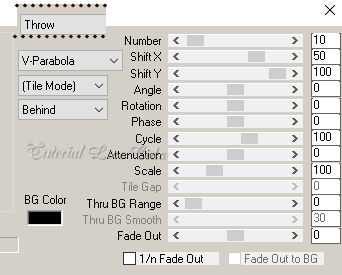
Objects → Align → Bottom.
Layers → Duplicate.
Image → Mirror → Mirror Horizontal.
Layers → Merge → Merge Down.
20_.
Effects → Geometric Effects → Pentagon — Repeat.
Objects → Align → Top.
Effects → 3D Effects → Drop Shadow: 0 / 0 / 80 / 40,00 — Color: #ffffff.
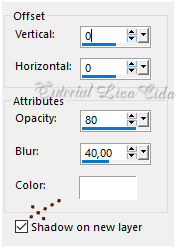
Ative a layer inferior Raster 6 Shadow 1.
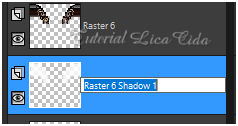
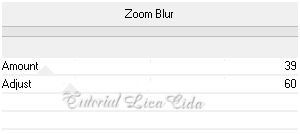
Plugin VM Stylize → Zoom Blur — Default (o efeito pode estar em outro plugin).
Blend Mode: Screen.
Ative a Raster 6.
Plugin Alien Skin Eye Candy 5: Impact → Perspective Shadow — Blurry.
Retire a visibilidade da layer do tube Femme chapeau jewel 012 (Raster 5).
Ative a layer superior (Raster 6).
21_.
Edit → Copy Special → Copy Merged.
Edit → Paste As New Layer.
22_.
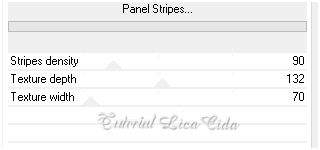
Plugin Tramages → Panel Stripes.
23_.
Image → Canvas Size: 1024 x 950 — Bottom: 50.
24_.
Plugin MuRa's Meister → Perspective Tiling — Default, Height: 15 (demais valores iguais).
Com a ferramenta Magic Wand — Feather: 60, clique na parte transparente.
Pressione a tecla Delete várias vezes, para suavizar o efeito.
Selections → Select None.
Plugin MuRa's Seamless → Emboss at Alpha — Default.
25_.
Effects → Reflection Effects → Rotating Mirror: 0 / 180 — Reflect.
26_.
Edit → Copy no elemento-mp
Edit → Paste As New Layer.
27_.
Effects → Image Effects → Offset: H: 0 / V: 38 — Custom e Transparent marcados.
28_.
Ative a visibilidade da layer do tube Femme chapeau jewel 012 (Raster 5).
Layers → Arrange → Bring to Top.
Posicione.
Plugin Alien Skin Eye Candy 5: Impact → Perspective Shadow — Blurry.
29_.
Edit → Copy no SuizaBella_Ref_AG-001939-10
Edit → Paste As New Layer.
Posicione.
Plugin Alien Skin Eye Candy 5: Impact → Perspective Shadow — Blurry.
30_.
Ative a Copy of Raster 2.
Plugin Nik Software → Color Efex Pro 3.0 → Bi-Color Filters — Color Set: Brown 1 — Default.
31_.
Image → Add Borders: 1 px, Symmetric marcado — Color: #ffffff.
Image → Add Borders: 1 px, Symmetric marcado — Color: #000000.
Selections → Select All.
Image → Add Borders: 45 px, Symmetric marcado — Color: #ffffff.
Effects → 3D Effects → Drop Shadow: 0 / 0 / 80 / 40,00 — Color: #000000.
Selections → Select None.
Image → Add Borders: 2 px, Symmetric marcado — Color: cor do Foreground (#5a1c00).
Image → Add Borders: 25 px, Symmetric marcado — Color: #ffffff.
32_.
Edit → Copy no acabamentoborda.mp
Edit → Paste As New Layer.
Image → Resize: Width 1024 px.
Aplique a marca-d'água.
Assine e salve.
Espero que gostem.
Obrigada!
Aparecida / LicaCida, abril de 2021.
Rio de Janeiro - Brasil.

VOLTAR
Copyright ©2026 - Web Design - Naise Minas
|


